1.导入黑马点评项目
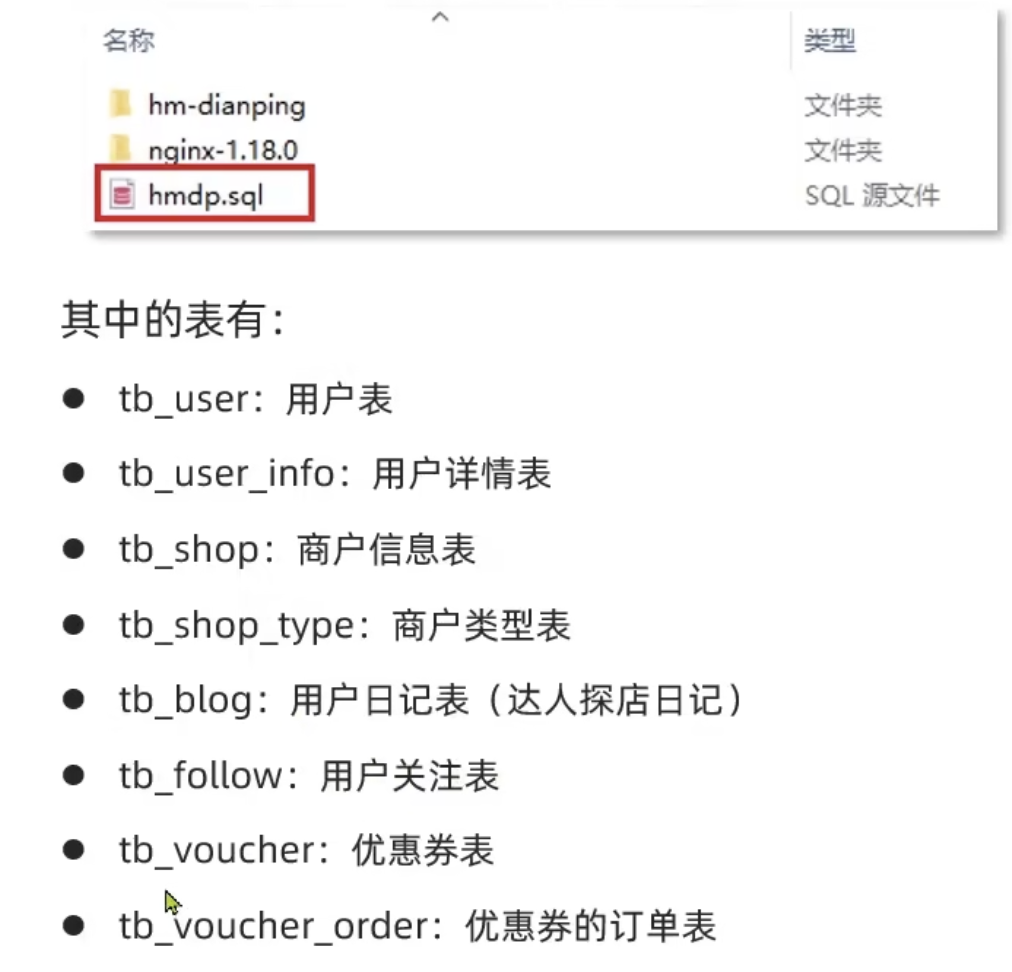
1.1 首先,导入课前资料提供的SQL文件:
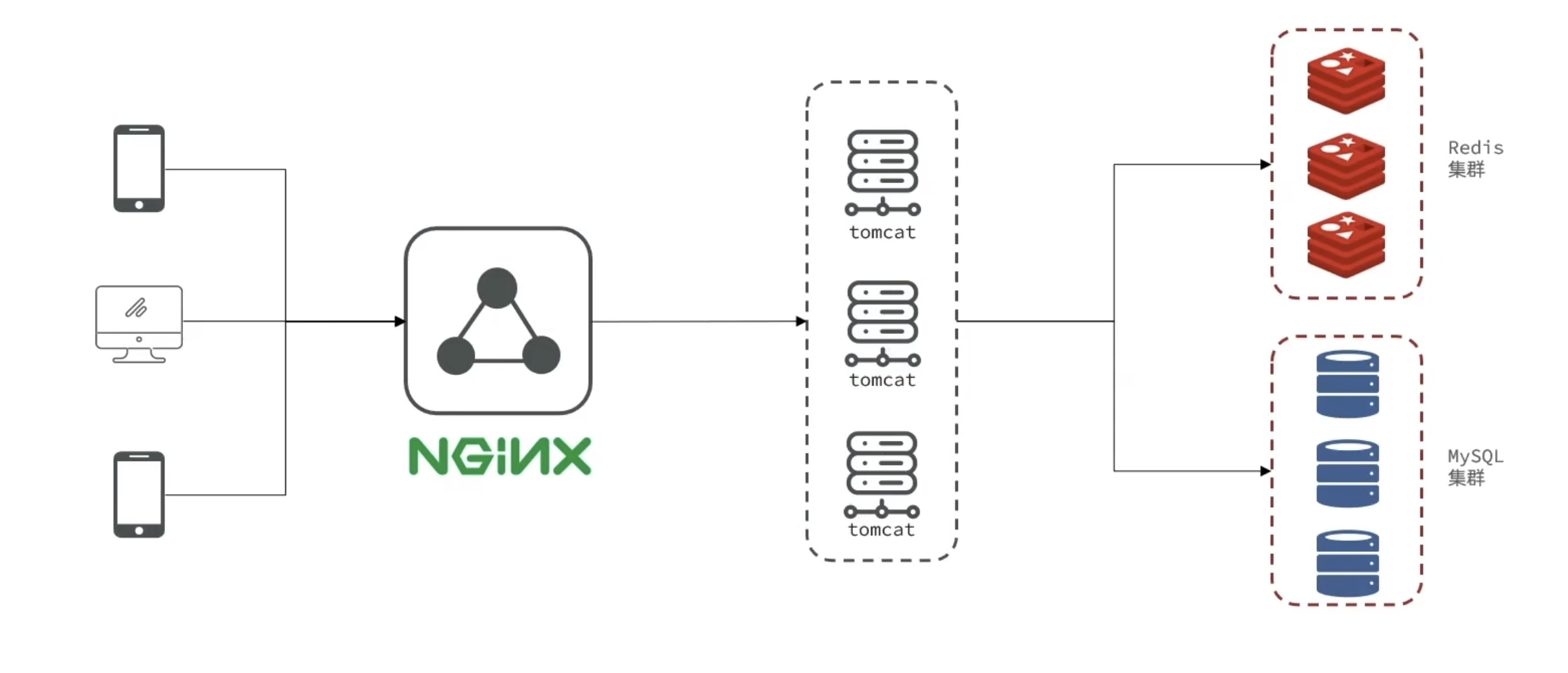
1.2 导入后端项目
在资料中提供了一个项目源码:
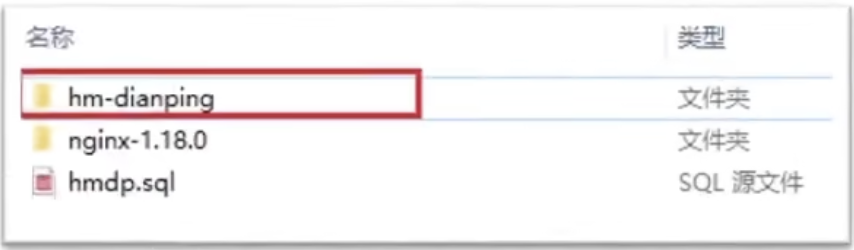
将其复制到你的idea工作空间,然后利用idea打开即可:
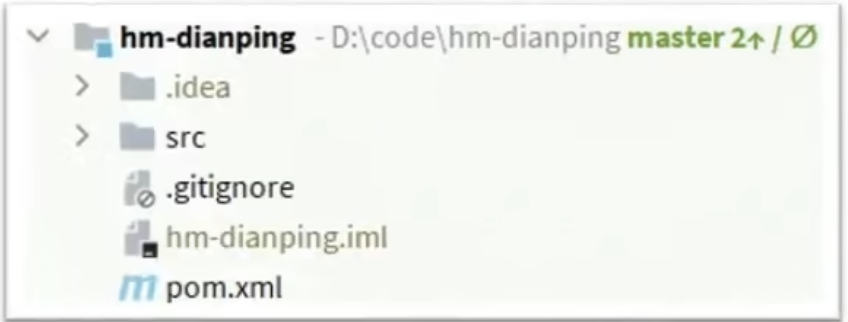
启动项目后,在浏览器访问: http://localhost:8081/shop-type/list 如果可以看到数据则证明运行没有问题
不要忘了修改application.yaml文件中的mysql、redis地址信息
1.3 导入前端项目
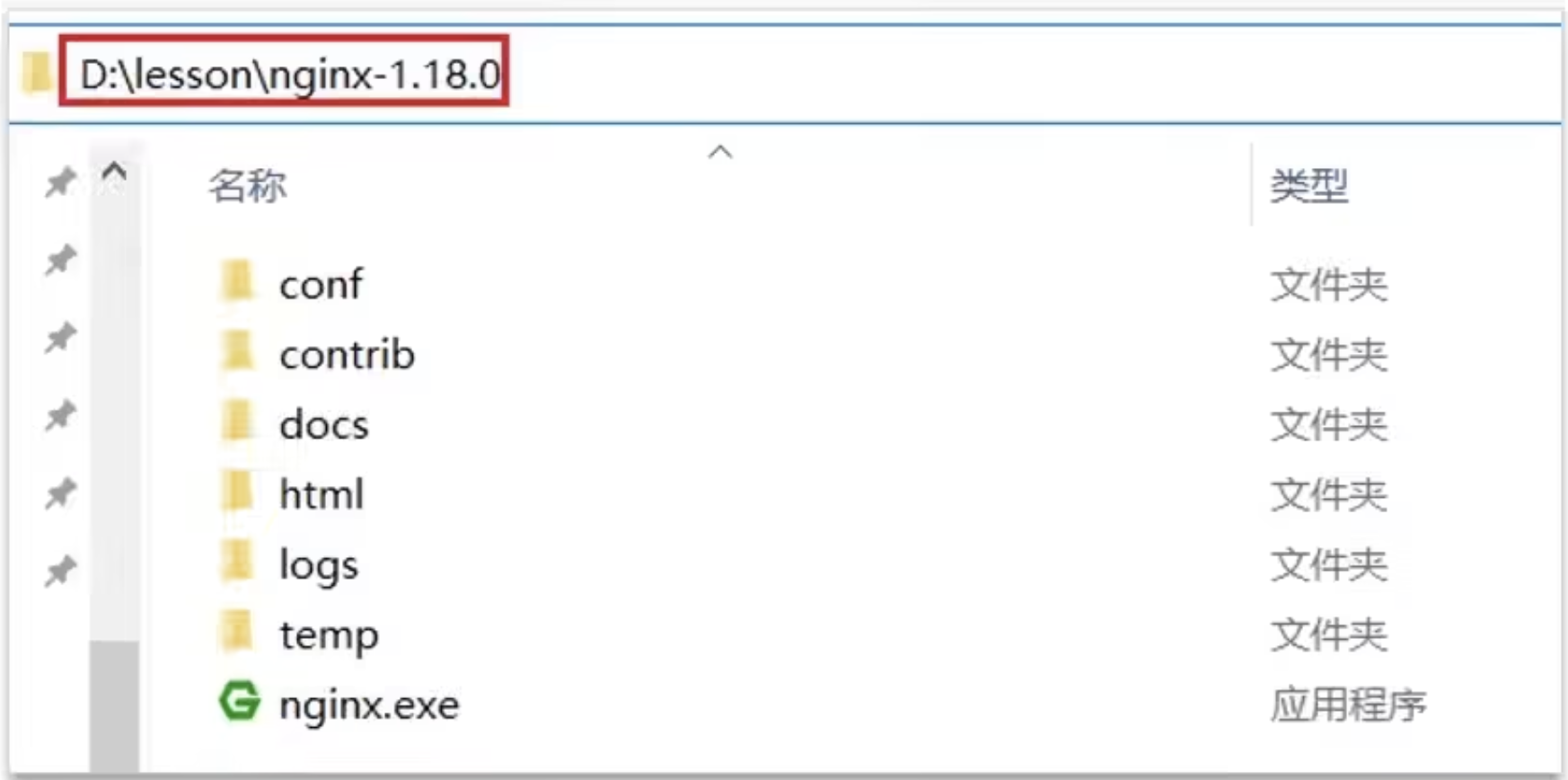
在资料中提供了一个nginx文件夹:

将其复制到任意目录,要确保该目录不包含中文、特殊字符和空格,例如:
运行前端项目
在nginx所在目录下打开一个CMD窗口,输入命令:
start nginx. exe
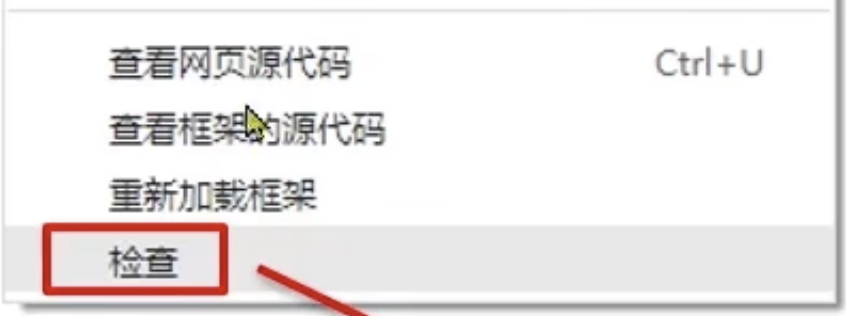
打开chrome浏览器,在空白页面点击鼠标右键,选择检查,即可打开开发者工具:
然后打开手机模式:
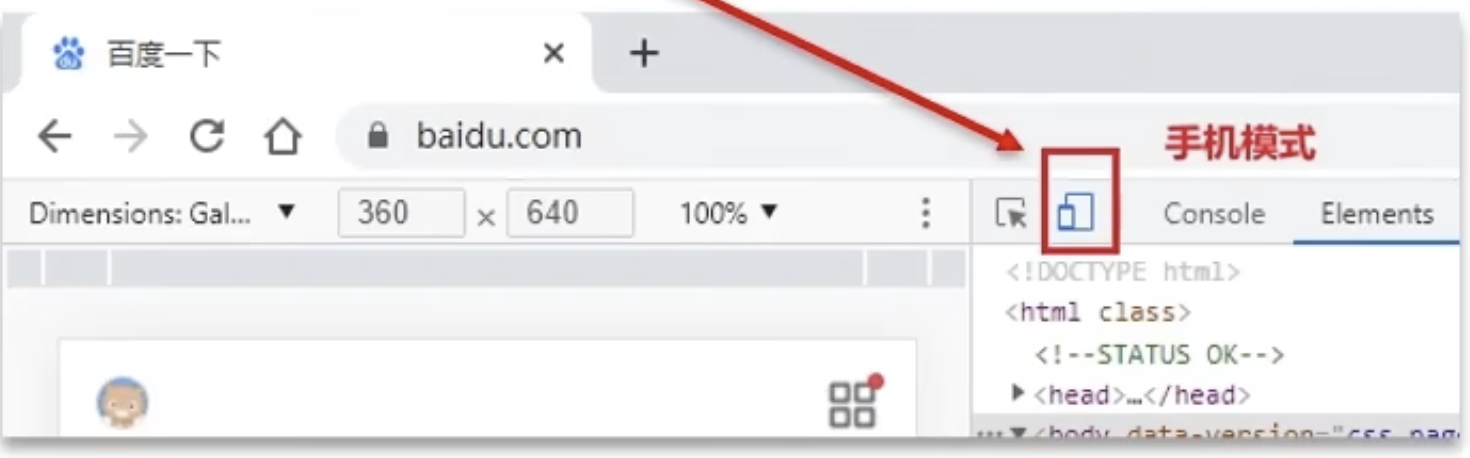
然后访问: http://127.0.0.1:8080 即可看到页面
如果是macOS,这样启动:
macOS 启动 Nginx 完整指南
🚨 重要提示
nginx.exe 是 Windows 可执行文件,无法在 macOS 上直接运行!
您需要在 macOS 上重新安装 Nginx。
方案一:使用 Homebrew 安装(强烈推荐)⭐
Step 1: 安装 Homebrew(如果还没有)
/bin/bash -c "$(curl -fsSL https://raw.githubusercontent.com/Homebrew/install/HEAD/install.sh)"
Step 2: 安装 Nginx
brew install nginx
Step 3: 启动 Nginx
# 方法1: 直接启动
sudo nginx

# 方法2: 使用 Homebrew 服务(推荐)
brew services start nginx

# 查看状态
brew services list
Step 4: 验证安装
# 检查 Nginx 版本
nginx -v

# 测试配置文件
nginx -t

# 访问测试
open http://localhost:8080
常用命令
# 启动
brew services start nginx
# 或
sudo nginx

# 停止
brew services stop nginx
# 或
sudo nginx -s stop

# 重启
brew services restart nginx
# 或
sudo nginx -s reload

# 查看状态
brew services list
方案二:迁移您当前的配置
如果您想使用当前目录的配置文件:
Step 1: 安装 Nginx(同上)
brew install nginx
Step 2: 复制配置文件
# 找到 Homebrew 安装的 Nginx 配置目录
# 通常在:/opt/homebrew/etc/nginx/ 或 /usr/local/etc/nginx/

# 复制您的配置
cp ~/用户/oxy/文稿/program/front/nginx-1.18.0/conf/nginx.conf /opt/homebrew/etc/nginx/nginx.conf

# 复制 html 文件
cp -r ~/用户/oxy/文稿/program/front/nginx-1.18.0/html/* /opt/homebrew/var/www/
Step 3: 测试并启动
# 测试配置
nginx -t

# 启动
sudo nginx
快速启动指南(推荐新手)
# 1. 安装 Nginx
brew install nginx

# 2. 查看安装位置
which nginx
# 输出:/opt/homebrew/bin/nginx

# 3. 查看配置文件位置
nginx -t
# 输出:nginx: configuration file /opt/homebrew/etc/nginx/nginx.conf test is successful

# 4. 启动 Nginx
brew services start nginx

# 5. 验证运行
curl http://localhost:8080
# 或在浏览器打开 http://localhost:8080

# 6. 查看日志
tail -f /opt/homebrew/var/log/nginx/access.log
tail -f /opt/homebrew/var/log/nginx/error.log
常见问题解决
1. 端口被占用
# 查看占用端口的进程
sudo lsof -i :8080

# 杀死进程
sudo kill -9 <PID>
2. 权限问题
# 确保有执行权限
sudo nginx

# 或修改配置文件中的用户
# 编辑 /opt/homebrew/etc/nginx/nginx.conf
# 将 user nobody; 改为 user 你的用户名;
3. 配置文件路径
# Homebrew 安装的 Nginx 配置文件位置
# Intel Mac: /usr/local/etc/nginx/
# Apple Silicon (M1/M2): /opt/homebrew/etc/nginx/

# 网站根目录
# Intel Mac: /usr/local/var/www/
# Apple Silicon: /opt/homebrew/var/www/
我的推荐方案 🎯
我建议:
- 使用 Homebrew 安装 Nginx(最简单)
- 将您的配置文件复制到新的 Nginx 配置目录
- 将 html 文件复制到新的网站根目录
具体操作:
# 1. 安装
brew install nginx

# 2. 备份原配置
cp /opt/homebrew/etc/nginx/nginx.conf /opt/homebrew/etc/nginx/nginx.conf.backup

# 3. 复制您的配置(需要调整路径)
cp ~/用户/oxy/文稿/program/front/nginx-1.18.0/conf/nginx.conf /opt/homebrew/etc/nginx/

# 4. 复制网站文件
cp -r ~/用户/oxy/文稿/program/front/nginx-1.18.0/html/* /opt/homebrew/var/www/

# 5. 测试配置
nginx -t

# 6. 启动
brew services start nginx
2.基于Session实现登录
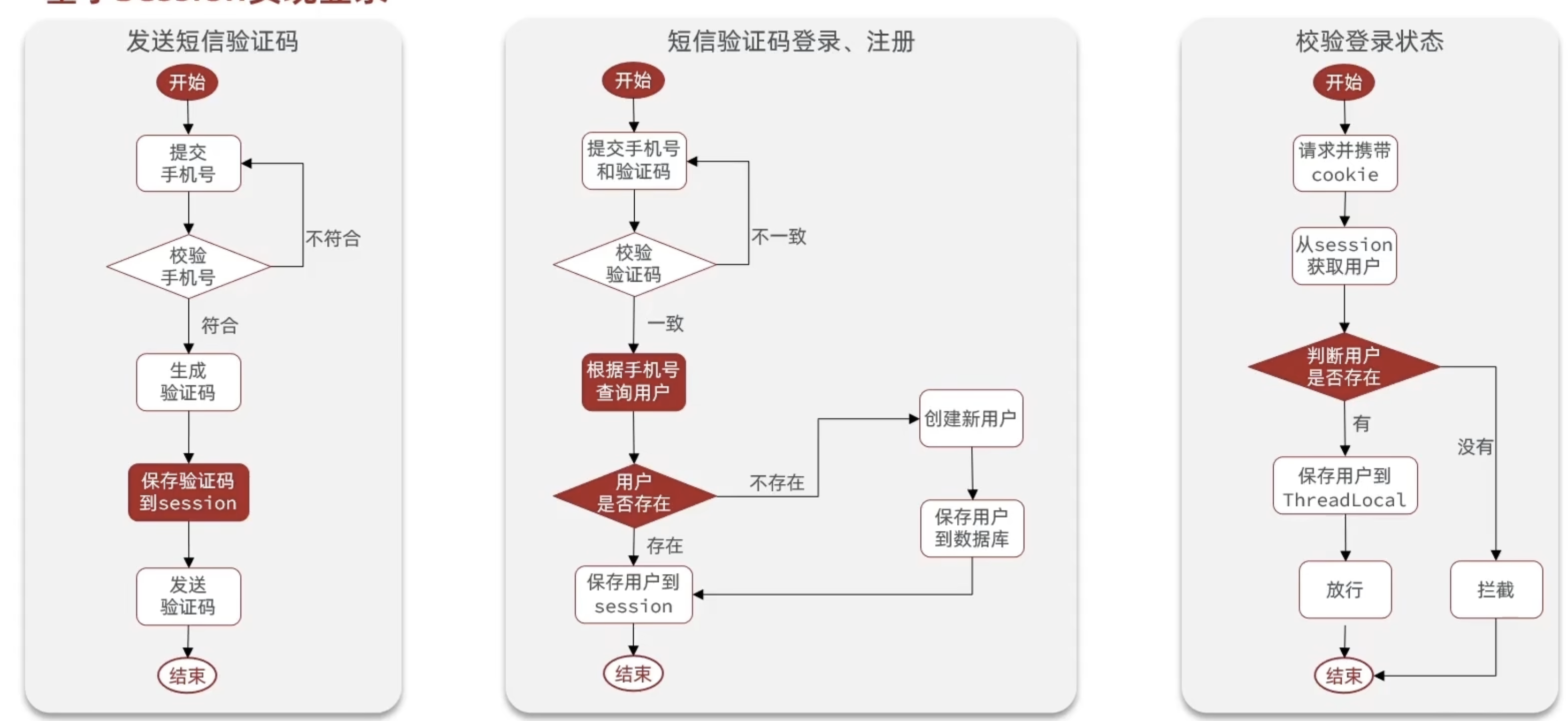
2.1 发送短信验证码
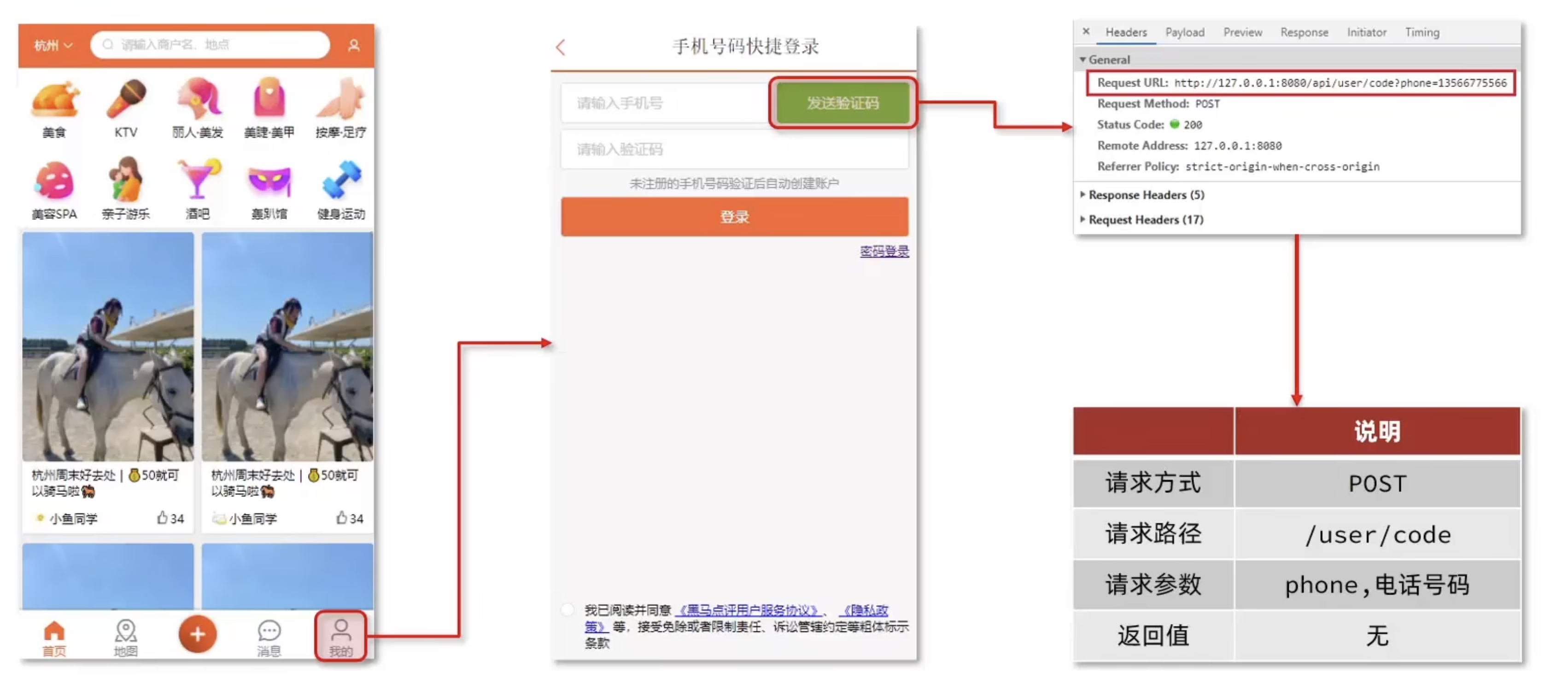
package com.hmdp.service.impl;

import cn.hutool.core.util.RandomUtil;
import com.baomidou.mybatisplus.extension.service.impl.ServiceImpl;
import com.hmdp.dto.Result;
import com.hmdp.entity.User;
import com.hmdp.mapper.UserMapper;
import com.hmdp.service.IUserService;
import com.hmdp.utils.RegexUtils;
import lombok.extern.slf4j.Slf4j;
import org.springframework.stereotype.Service;

import javax.servlet.http.HttpSession;

/**
 * <p>
 * 服务实现类
 * </p>
 *
 * @author 虎哥
 * @since 2021-12-22
 */@Slf4j
@Service
public class UserServiceImpl extends ServiceImpl<UserMapper, User> implements IUserService {

    @Override
    public Result setCode(String phone, HttpSession session) {
        // 1.校验手机号
        if (!RegexUtils.isPhoneInvalid(phone)) {
            // 2.如果不符合,返回错误信息
            return Result.fail("手机号格式错误!");
        }
        // 3.如果符合,生成一个验证码
        String code = RandomUtil.randomNumbers(6);

        // 4.保存验证码到session
        session.setAttribute("code", code);

        // 5.发送验证码
        log.debug("发送短信验证码成功,验证码:{}", code);

        // 6.返回ok
        return Result.ok();
    }
}
2.2 短信验证码登录
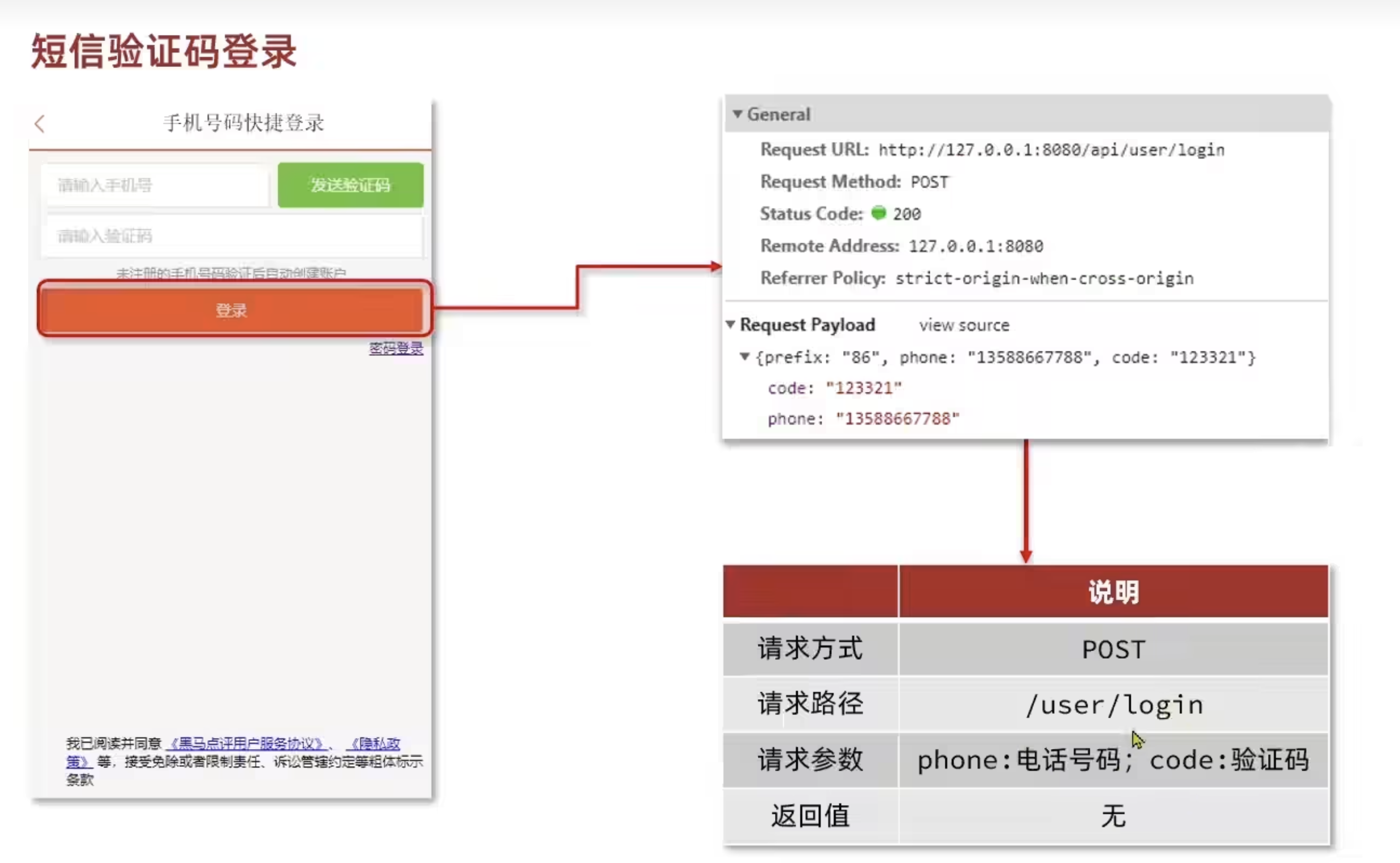
package com.hmdp.service.impl;

import cn.hutool.core.util.RandomUtil;
import com.baomidou.mybatisplus.extension.service.impl.ServiceImpl;
import com.hmdp.dto.LoginFormDTO;
import com.hmdp.dto.Result;
import com.hmdp.entity.User;
import com.hmdp.mapper.UserMapper;
import com.hmdp.service.IUserService;
import com.hmdp.utils.RegexUtils;
import lombok.extern.slf4j.Slf4j;
import org.springframework.stereotype.Service;

import javax.servlet.http.HttpSession;

/**
 * <p>
 * 服务实现类
 * </p>
 *
 * @author 虎哥
 * @since 2021-12-22
 */@Slf4j
@Service
public class UserServiceImpl extends ServiceImpl<UserMapper, User> implements IUserService {

    @Override
    public Result setCode(String phone, HttpSession session) {
        // 1.校验手机号
        if (!RegexUtils.isPhoneInvalid(phone)) {
            // 2.如果不符合,返回错误信息
            return Result.fail("手机号格式错误!");
        }
        // 3.如果符合,生成一个验证码
        String code = RandomUtil.randomNumbers(6);

        // 4.保存验证码到session
        session.setAttribute("code", code);

        // 5.发送验证码
        log.debug("发送短信验证码成功,验证码:{}", code);

        // 6.返回ok
        return Result.ok();
    }

    @Override
    public Result login(LoginFormDTO loginForm, HttpSession session) {
        // 1.校验手机号
        String phone = loginForm.getPhone();
        if (!RegexUtils.isPhoneInvalid(phone)) {
            // 2.如果不符合,返回错误信息
            return Result.fail("手机号格式错误!");
        }

        // 2.校验验证码
        Object cacheCode = session.getAttribute("code");
        String code = loginForm.getCode();
        if (cacheCode == null || !cacheCode.toString().equals(code)) {
            // 3.如果不一致,报错
            return Result.fail("验证码错误!");
        }

        // 4.如果一致,根据手机号查询用户 select * from tb_user where phone = ?        User user = query().eq("phone", phone).one();

        // 5.判断用户是否存在
        if (user == null) {
            // 6.如果不存在,创建新用户并保存
            user = createUserWithPhone(phone);
        }

        // 7.如果存在,保存用户信息到session
        session.setAttribute("user", user);

        // 8.返回ok
        return Result.ok();
    }

    private User createUserWithPhone(String phone) {
        // 1.创建用户
        User user = new User();
        user.setPhone(phone);
        user.setNickName("user_" + RandomUtil.randomString(10));
        // 2.保存用户
        save(user);
        // 3.返回用户
        return user;
    }
}
2.3 登录验证功能
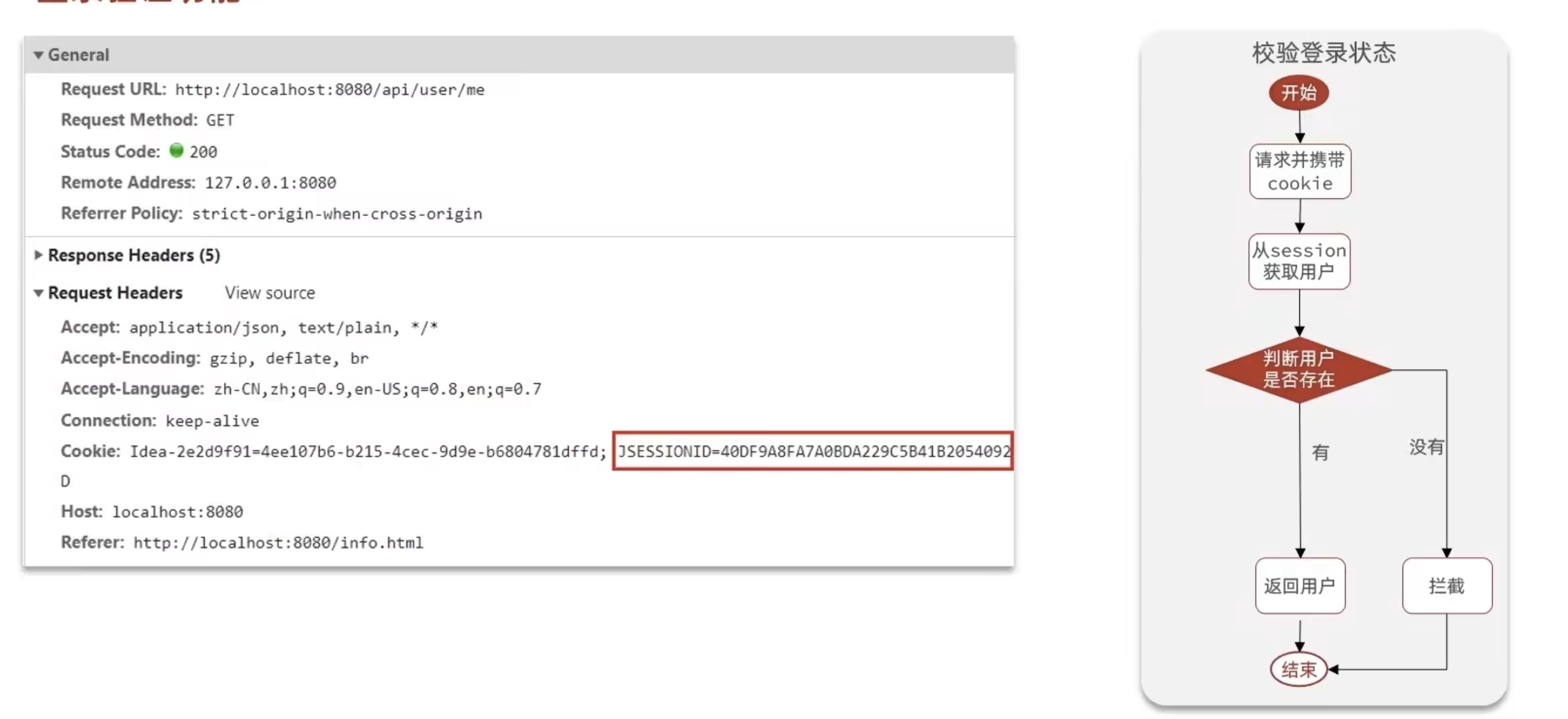
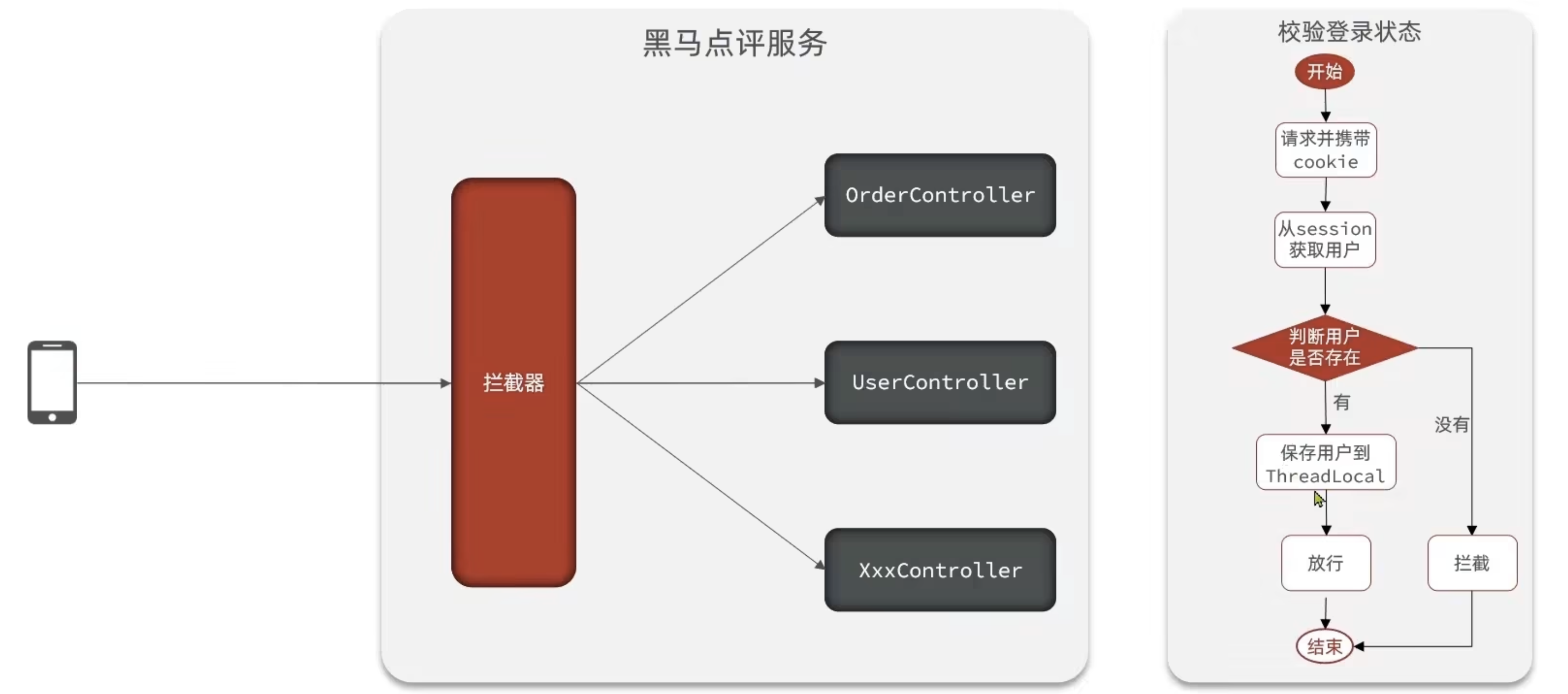
package com.hmdp.utils;

import com.hmdp.dto.UserDTO;
import org.springframework.web.servlet.HandlerInterceptor;

import javax.servlet.http.HttpServletRequest;
import javax.servlet.http.HttpServletResponse;
import javax.servlet.http.HttpSession;

/**
 * 这个类是:
 *
 * @author: CHINHAE
 * @date: 2025/10/12 16:51
 * @version: 1.0
 */public class LoginInterceptor implements HandlerInterceptor{
    @Override
    public boolean preHandle(HttpServletRequest request, HttpServletResponse response, Object handler) throws Exception {
        // 1.获取session
        HttpSession session = request.getSession();
        // 2.获取session中的用户
        Object user = session.getAttribute("user");
        // 3.判断用户是否存在
        if (user == null) {
            // 4.如果用户不存在,返回false
            response.setStatus(401);
            return false;
        }
        // 5.如果用户存在,将用户信息保存到ThreadLocal
        UserHolder.saveUser((UserDTO) user);
        // 6.放行
        return true;
    }

    @Override
    public void afterCompletion(HttpServletRequest request, HttpServletResponse response, Object handler, Exception ex) throws Exception {
        // 1.移除ThreadLocal中的用户
        UserHolder.removeUser();
    }
}
package com.hmdp.config;

import com.hmdp.utils.LoginInterceptor;
import org.springframework.context.annotation.Configuration;
import org.springframework.web.servlet.config.annotation.InterceptorRegistry;
import org.springframework.web.servlet.config.annotation.WebMvcConfigurer;

/**
 * 这个类是:
 *
 * @author: CHINHAE
 * @date: 2025/10/12 16:58
 * @version: 1.0
 */@Configuration
public class MvcConfig implements WebMvcConfigurer {

    @Override
    public void addInterceptors(InterceptorRegistry registry) {
        registry.addInterceptor(new LoginInterceptor())
            .excludePathPatterns(
                "/user/code",
"/user/login",
"/blog/hot",
"/shop/**",
"/shop-type/**",
"/voucher/**",
                "/upload/**"
                );
    }
}
package com.hmdp.service.impl;

import cn.hutool.core.bean.BeanUtil;
import cn.hutool.core.util.RandomUtil;
import com.baomidou.mybatisplus.extension.service.impl.ServiceImpl;
import com.hmdp.dto.LoginFormDTO;
import com.hmdp.dto.Result;
import com.hmdp.dto.UserDTO;
import com.hmdp.entity.User;
import com.hmdp.mapper.UserMapper;
import com.hmdp.service.IUserService;
import com.hmdp.utils.RegexUtils;
import lombok.extern.slf4j.Slf4j;
import org.springframework.stereotype.Service;

import javax.servlet.http.HttpSession;

/**
 * <p>
 * 服务实现类
 * </p>
 *
 * @author 虎哥
 * @since 2021-12-22
 */@Slf4j
@Service
public class UserServiceImpl extends ServiceImpl<UserMapper, User> implements IUserService {

    @Override
    public Result setCode(String phone, HttpSession session) {
        // 1.校验手机号
        if (!RegexUtils.isPhoneInvalid(phone)) {
            // 2.如果不符合,返回错误信息
            return Result.fail("手机号格式错误!");
        }
        // 3.如果符合,生成一个验证码
        String code = RandomUtil.randomNumbers(6);

        // 4.保存验证码到session
        session.setAttribute("code", code);

        // 5.发送验证码
        log.debug("发送短信验证码成功,验证码:{}", code);

        // 6.返回ok
        return Result.ok();
    }

    @Override
    public Result login(LoginFormDTO loginForm, HttpSession session) {
        // 1.校验手机号
        String phone = loginForm.getPhone();
        if (!RegexUtils.isPhoneInvalid(phone)) {
            // 2.如果不符合,返回错误信息
            return Result.fail("手机号格式错误!");
        }

        // 2.校验验证码
        Object cacheCode = session.getAttribute("code");
        String code = loginForm.getCode();
        if (cacheCode == null || !cacheCode.toString().equals(code)) {
            // 3.如果不一致,报错
            return Result.fail("验证码错误!");
        }

        // 4.如果一致,根据手机号查询用户 select * from tb_user where phone = ?        User user = query().eq("phone", phone).one();

        // 5.判断用户是否存在
        if (user == null) {
            // 6.如果不存在,创建新用户并保存
            user = createUserWithPhone(phone);
        }

        // 7.如果存在,保存用户信息到session(将User转换为UserDTO)
        UserDTO userDTO = BeanUtil.copyProperties(user, UserDTO.class);
        session.setAttribute("user", userDTO);

        // 8.返回ok
        return Result.ok();
    }

    private User createUserWithPhone(String phone) {
        // 1.创建用户
        User user = new User();
        user.setPhone(phone);
        user.setNickName("user_" + RandomUtil.randomString(10));
        // 2.保存用户
        save(user);
        // 3.返回用户
        return user;
    }
}
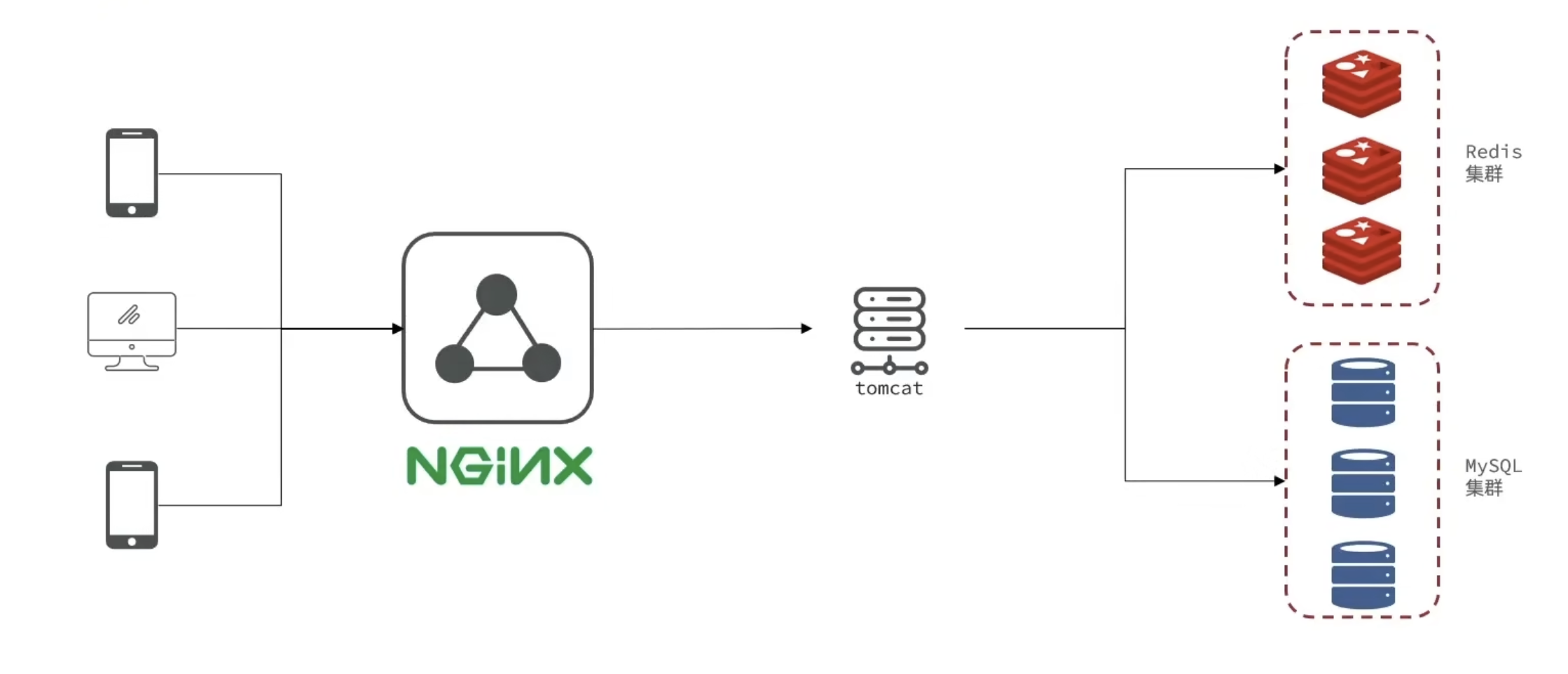
3.集群的session共享问题
session共享问题:多台Tomcat并不共享session存储空间,当请求切换到不同tomcat服务时导致数据丢失的问题。
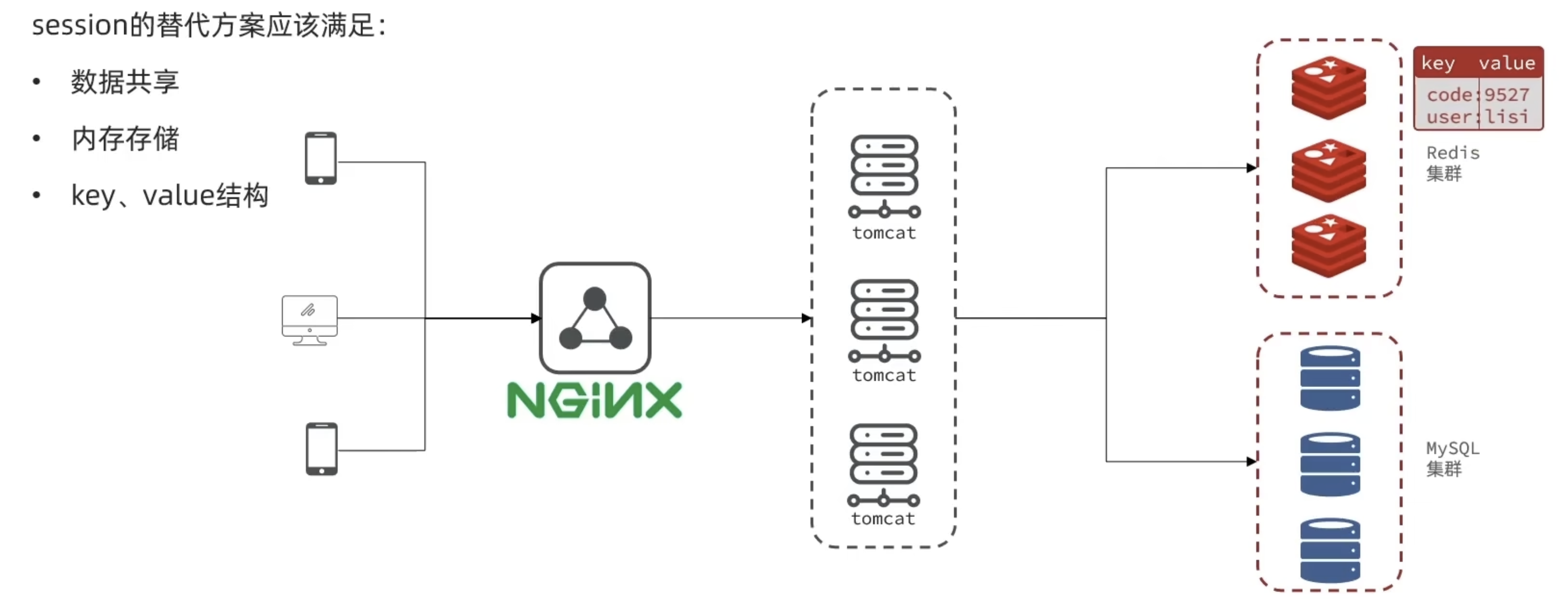
4.基于Redis实现共享session登录
保存登录的用户信息,可以使用String结构,以JSON字符串来保存,比较直观:

Hash结构可以将对象中的每个字段独立存储,可以针对单个字段做CRUD,并且内存占用更少:
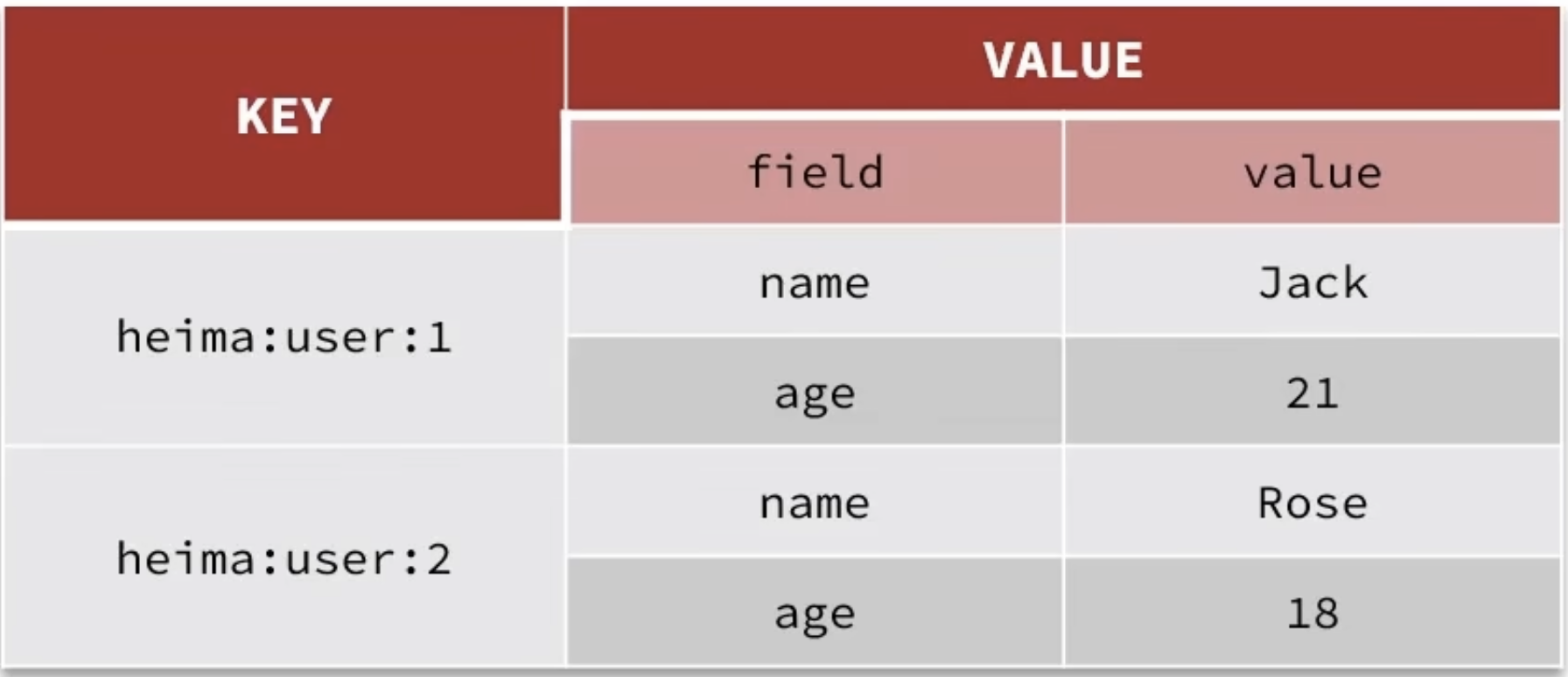
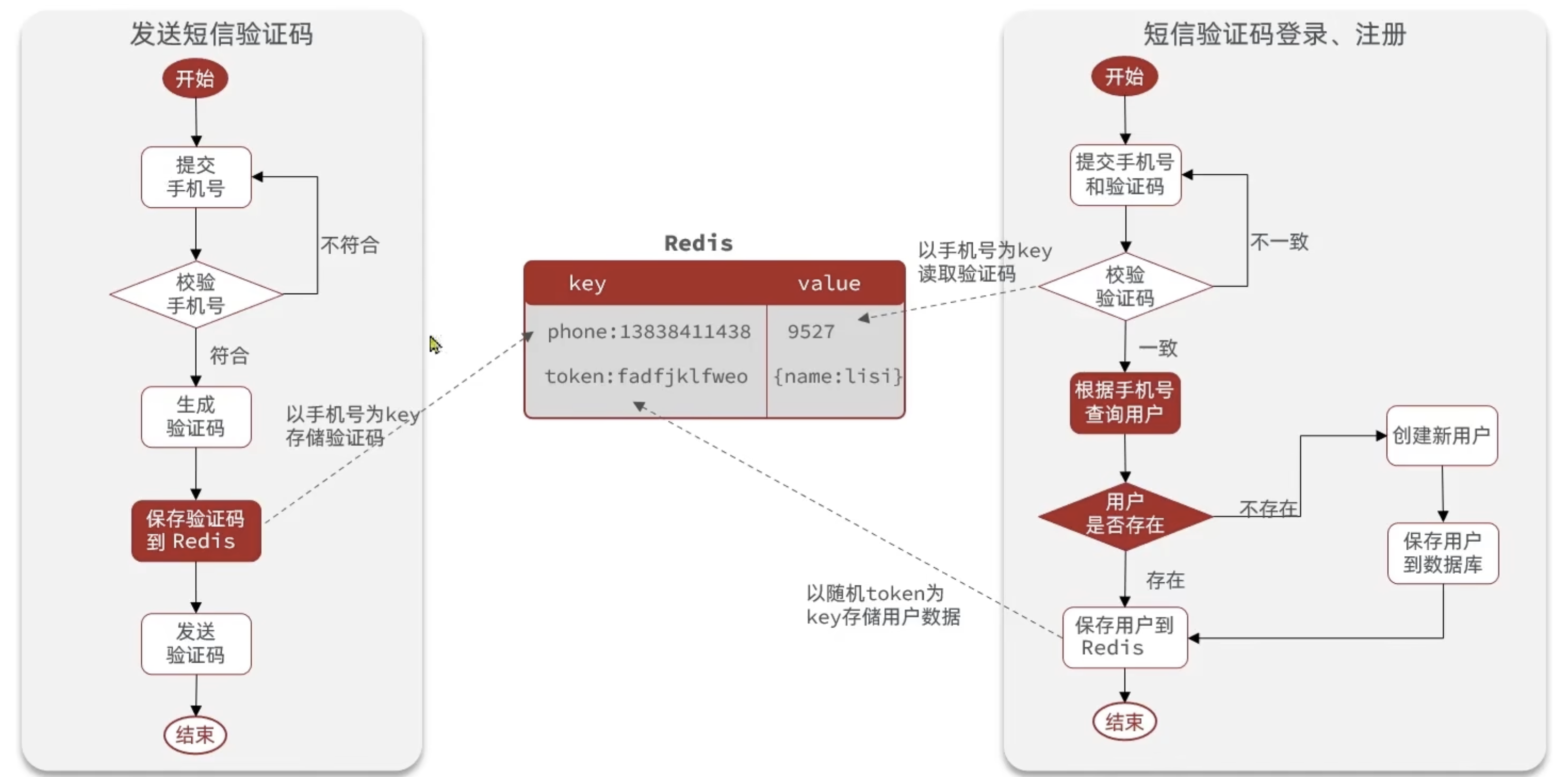
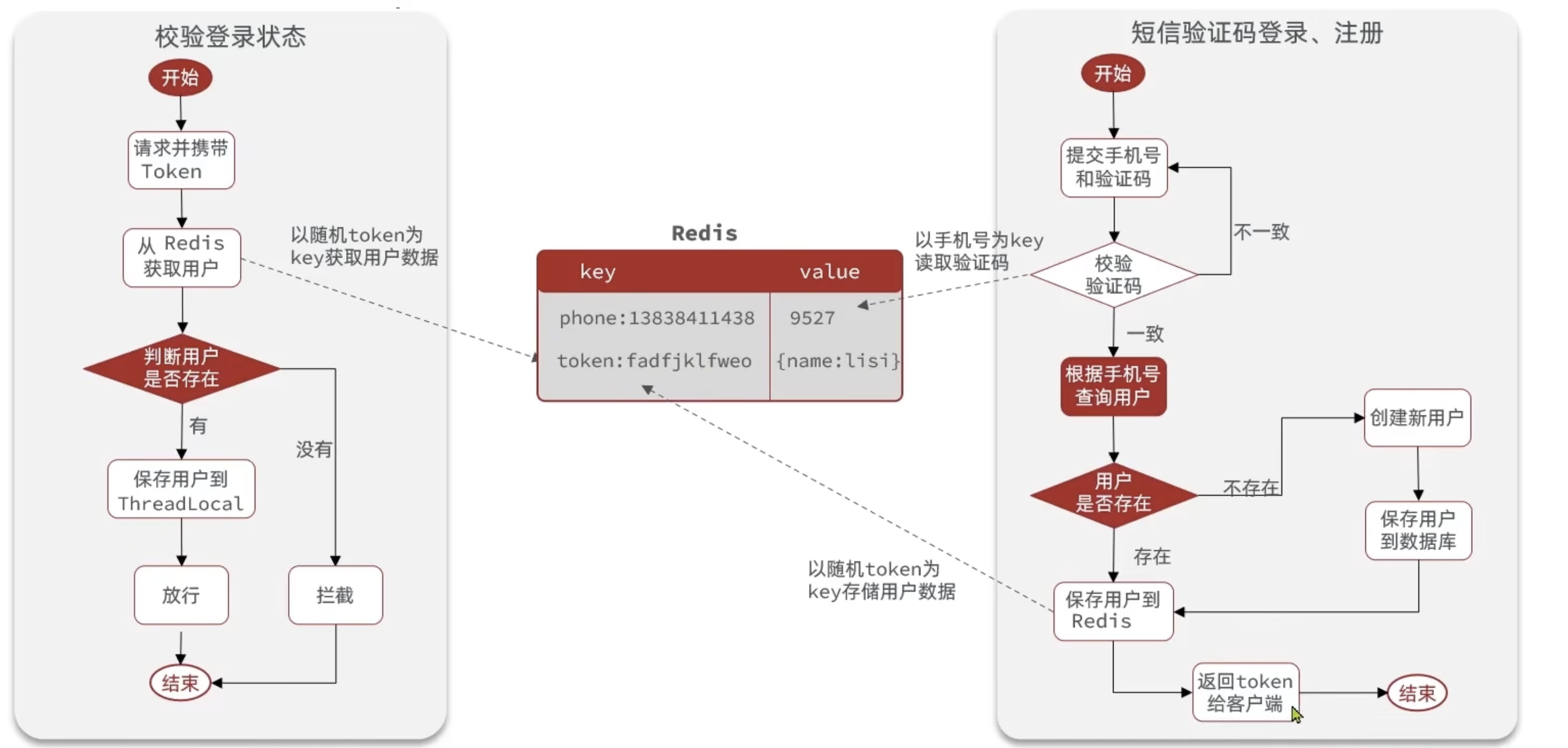
Redis代替session需要考虑的问题:
- 选择合适的数据结构
- 选择合适的key
- 选择合适的存储粒度
package com.hmdp.service.impl;

import cn.hutool.core.bean.BeanUtil;
import cn.hutool.core.bean.copier.CopyOptions;
import cn.hutool.core.lang.UUID;
import cn.hutool.core.util.RandomUtil;
import com.baomidou.mybatisplus.extension.service.impl.ServiceImpl;
import com.hmdp.dto.LoginFormDTO;
import com.hmdp.dto.Result;
import com.hmdp.dto.UserDTO;
import com.hmdp.entity.User;
import com.hmdp.mapper.UserMapper;
import com.hmdp.service.IUserService;
import com.hmdp.utils.RegexUtils;
import lombok.extern.slf4j.Slf4j;
import org.springframework.beans.factory.annotation.Autowired;
import org.springframework.data.redis.core.StringRedisTemplate;
import org.springframework.stereotype.Service;

import javax.servlet.http.HttpSession;
import java.util.HashMap;
import java.util.Map;
import java.util.concurrent.TimeUnit;

import static com.hmdp.utils.RedisConstants.LOGIN_CODE_KEY;
import static com.hmdp.utils.RedisConstants.LOGIN_CODE_TTL;
import static com.hmdp.utils.RedisConstants.LOGIN_USER_KEY;
import static com.hmdp.utils.RedisConstants.LOGIN_USER_TTL;

/**
 * <p>
 * 服务实现类
 * </p>
 *
 * @author 虎哥
 * @since 2021-12-22
 */@Slf4j
@Service
public class UserServiceImpl extends ServiceImpl<UserMapper, User> implements IUserService {

    @Autowired
    private StringRedisTemplate stringRedisTemplate;

    @Override
    public Result setCode(String phone, HttpSession session) {
        // 1.校验手机号
        if (!RegexUtils.isPhoneInvalid(phone)) {
            // 2.如果不符合,返回错误信息
            return Result.fail("手机号格式错误!");
        }
        // 3.如果符合,生成一个验证码
        String code = RandomUtil.randomNumbers(6);

        // 4.保存验证码到redis // set key value ex 120 单位秒
        stringRedisTemplate.opsForValue().set(LOGIN_CODE_KEY + phone, code, LOGIN_CODE_TTL, TimeUnit.MINUTES);

        // 5.发送验证码
        log.debug("发送短信验证码成功,验证码:{}", code);

        // 6.返回ok
        return Result.ok();
    }

    @Override
    public Result login(LoginFormDTO loginForm, HttpSession session) {
        // 1.校验手机号
        String phone = loginForm.getPhone();
        if (!RegexUtils.isPhoneInvalid(phone)) {
            // 2.如果不符合,返回错误信息
            return Result.fail("手机号格式错误!");
        }

        // 2.从redis中获取验证码
        String cacheCode = stringRedisTemplate.opsForValue().get(LOGIN_CODE_KEY + phone);
        String code = loginForm.getCode();
        // 3.比较验证码
        if (cacheCode == null || !cacheCode.equals(code)) {
            // 3.如果不一致,报错
            return Result.fail("验证码错误!");
        }

        // 4.如果一致,根据手机号查询用户 select * from tb_user where phone = ?        User user = query().eq("phone", phone).one();

        // 5.判断用户是否存在
        if (user == null) {
            // 6.如果不存在,创建新用户并保存
            user = createUserWithPhone(phone);
        }

        // 6.随机生成token,作为登录令牌
        String token = UUID.randomUUID().toString(true);

        // 7.将User对象换为Hash存储
        UserDTO userDTO = BeanUtil.copyProperties(user, UserDTO.class);
        Map<String, Object> userMap = BeanUtil.beanToMap(userDTO,new HashMap<>(),
            CopyOptions.create()
            .setIgnoreNullValue(true)
            .setFieldValueEditor((fieldName, fieldValue) -> fieldValue.toString()));

        // 8.存储token到redis
        String tokenKey = LOGIN_USER_KEY + token;
        stringRedisTemplate.opsForHash().putAll(tokenKey, userMap);
        // 9.设置token的过期时间
        stringRedisTemplate.expire(tokenKey, LOGIN_USER_TTL, TimeUnit.MINUTES);

        // 9.返回ok
        return Result.ok(token);
    }

    private User createUserWithPhone(String phone) {
        // 1.创建用户
        User user = new User();
        user.setPhone(phone);
        user.setNickName("user_" + RandomUtil.randomString(10));
        // 2.保存用户
        save(user);
        // 3.返回用户
        return user;
    }
}
5.登录拦截器的优化
之前的拦截器流程:
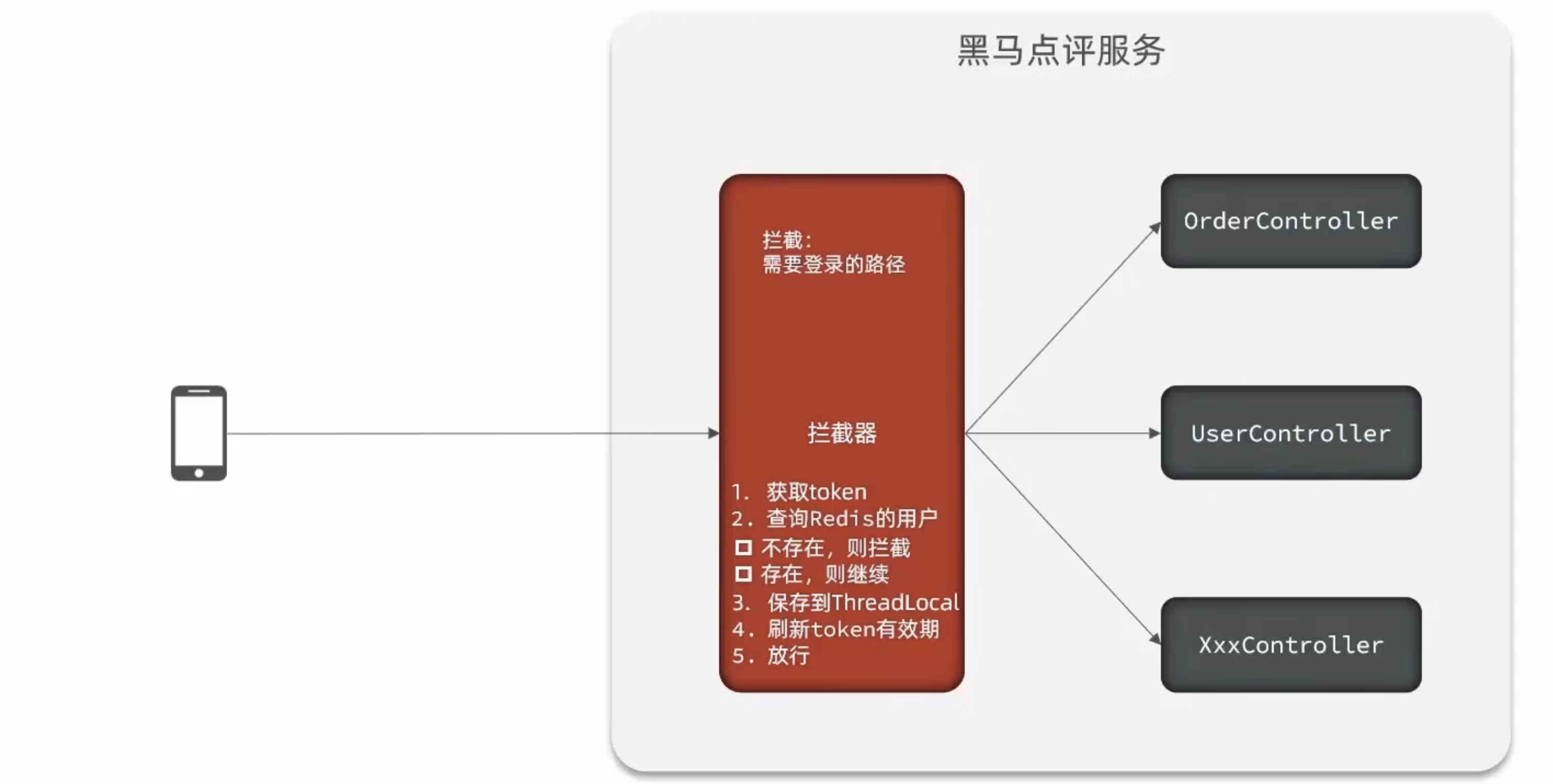
优化的流程:
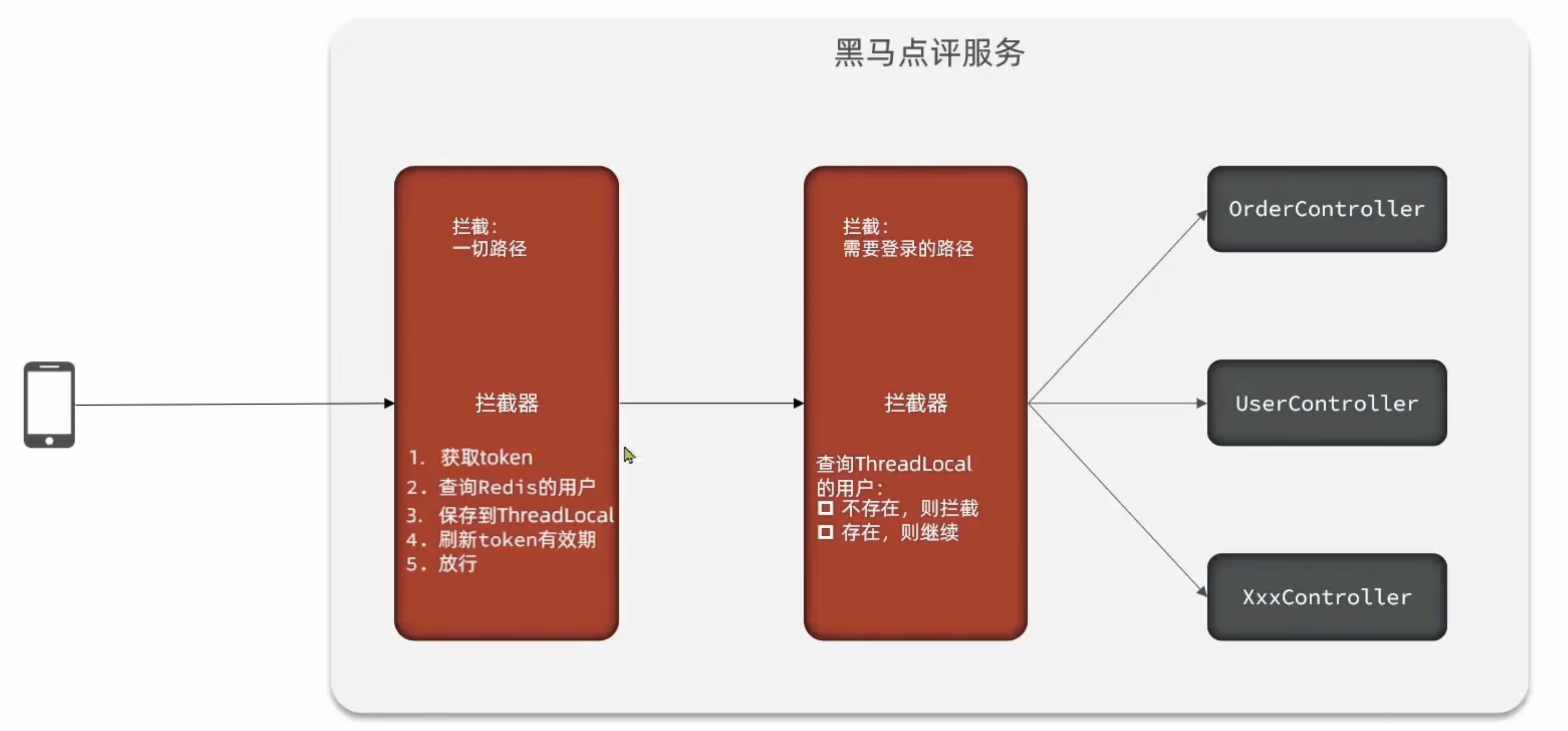
package com.hmdp.config;

import com.hmdp.utils.LoginInterceptor;
import com.hmdp.utils.RefreshTokenInterceptor;
import org.springframework.context.annotation.Configuration;
import org.springframework.data.redis.core.StringRedisTemplate;
import org.springframework.web.servlet.config.annotation.InterceptorRegistry;
import org.springframework.web.servlet.config.annotation.WebMvcConfigurer;

import javax.annotation.Resource;

/**
 * 这个类是:
 *
 * @author: CHINHAE
 * @date: 2025/10/12 16:58
 * @version: 1.0
 */@Configuration
public class MvcConfig implements WebMvcConfigurer {

    @Resource
    private StringRedisTemplate stringRedisTemplate;

    @Override
    public void addInterceptors(InterceptorRegistry registry) {
        // 登录拦截器
        registry.addInterceptor(new LoginInterceptor())
            .excludePathPatterns(
                "/user/code",
"/user/login",
"/blog/hot",
"/shop/**",
"/shop-type/**",
"/voucher/**",
                "/upload/**"
                ).order(1);

        // 刷新token拦截器
        registry.addInterceptor(new RefreshTokenInterceptor(stringRedisTemplate))
            .addPathPatterns("/**").order(0);
    }
}
package com.hmdp.utils;

import org.springframework.web.servlet.HandlerInterceptor;

import javax.servlet.http.HttpServletRequest;
import javax.servlet.http.HttpServletResponse;

/**
 * 这个类是:
 *
 * @author: CHINHAE
 * @date: 2025/10/12 16:51
 * @version: 1.0
 */public class LoginInterceptor implements HandlerInterceptor{

    @Override
    public boolean preHandle(HttpServletRequest request, HttpServletResponse response, Object handler) throws Exception {
        // 1.判断是否需要拦截(ThreadLocal中是否有用户)
        if (UserHolder.getUser() == null) {
            // 2.没有,需要拦截,设置状态码
            response.setStatus(401);
            return false;
        }
        // 3.有,则放行
        return true;
    }
}
package com.hmdp.utils;

import cn.hutool.core.bean.BeanUtil;
import cn.hutool.core.util.StrUtil;
import com.hmdp.dto.UserDTO;
import org.springframework.data.redis.core.StringRedisTemplate;
import org.springframework.web.servlet.HandlerInterceptor;

import javax.servlet.http.HttpServletRequest;
import javax.servlet.http.HttpServletResponse;
import java.util.Map;
import java.util.concurrent.TimeUnit;

/**
 * 这个类是:
 *
 * @author: CHINHAE
 * @date: 2025/10/12 16:51
 * @version: 1.0
 */public class RefreshTokenInterceptor implements HandlerInterceptor{

    private StringRedisTemplate stringRedisTemplate;

    public RefreshTokenInterceptor(StringRedisTemplate stringRedisTemplate) {
        this.stringRedisTemplate = stringRedisTemplate;
    }

    @Override
    public boolean preHandle(HttpServletRequest request, HttpServletResponse response, Object handler) throws Exception {
        // 1.获取请求头中的token
        String token = request.getHeader("authorization");
        if (StrUtil.isBlank(token)) {
            return true;
        }
        // 2.基于token获取redis中的用户
        String key = RedisConstants.LOGIN_USER_KEY + token;
        Map<Object, Object> userMap = stringRedisTemplate.opsForHash()
            .entries(key);
        // 3.判断用户是否存在
        if (userMap.isEmpty()) {
            return true;
        }
        // 5.将查询到的Hash数据转换为UserDTO对象
        UserDTO userDTO = BeanUtil.fillBeanWithMap(userMap, new UserDTO(), false);

        // 6.存在,则将用户信息保存到ThreadLocal
        UserHolder.saveUser(userDTO);

        // 7.刷新token的有效期
        stringRedisTemplate.expire(key, RedisConstants.LOGIN_USER_TTL, TimeUnit.MINUTES);

        // 8.放行
        return true;
    }

    @Override
    public void afterCompletion(HttpServletRequest request, HttpServletResponse response, Object handler, Exception ex) throws Exception {
        // 1.移除ThreadLocal中的用户
        UserHolder.removeUser();
    }


}