1.会话技术
1.1 为什么需要会话管理?
HTTP 协议是无状态的,服务器无法识别多个请求是否来自同一用户。会话管理技术解决了这个问题,使服务器能够跟踪用户状态。
1.2 介绍
会话:用户打开浏览器,访问web服务器的资源,会话建立,直到有一方断开连接,会话结束。在一次会话中可以包含多次请求和响应。
会话跟踪:一种维护浏览器状态的方法,服务器需要识别多次请求是否来自于同一浏览器,以便在同一次会话的多次请求间共享数据。
会话跟踪方案:
- 客户端会话跟踪技术:Cookie
- 服务端会话跟踪技术:Session
- 令牌技术
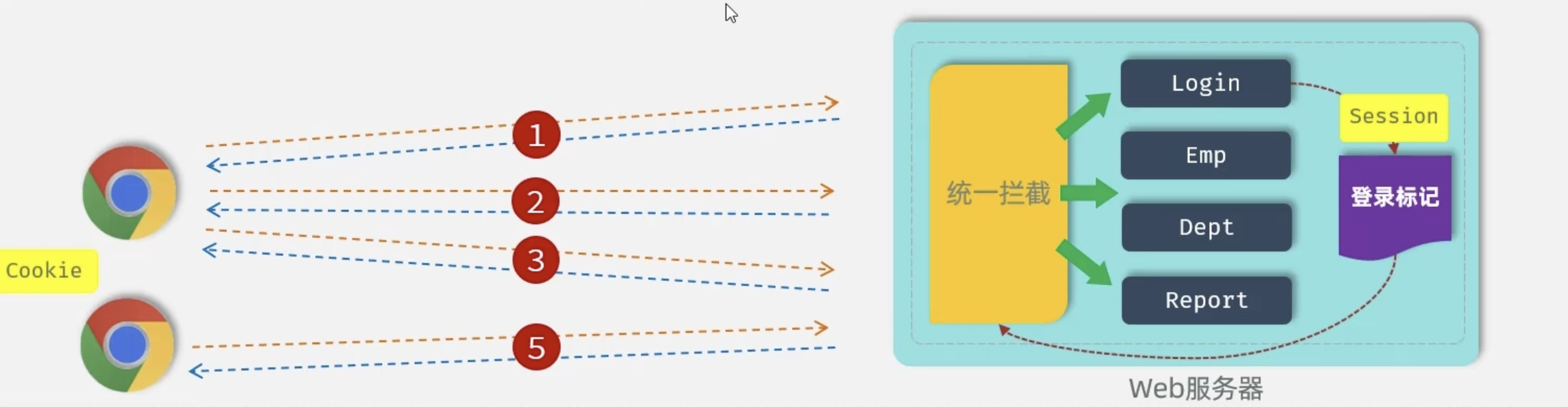
2.Cookie
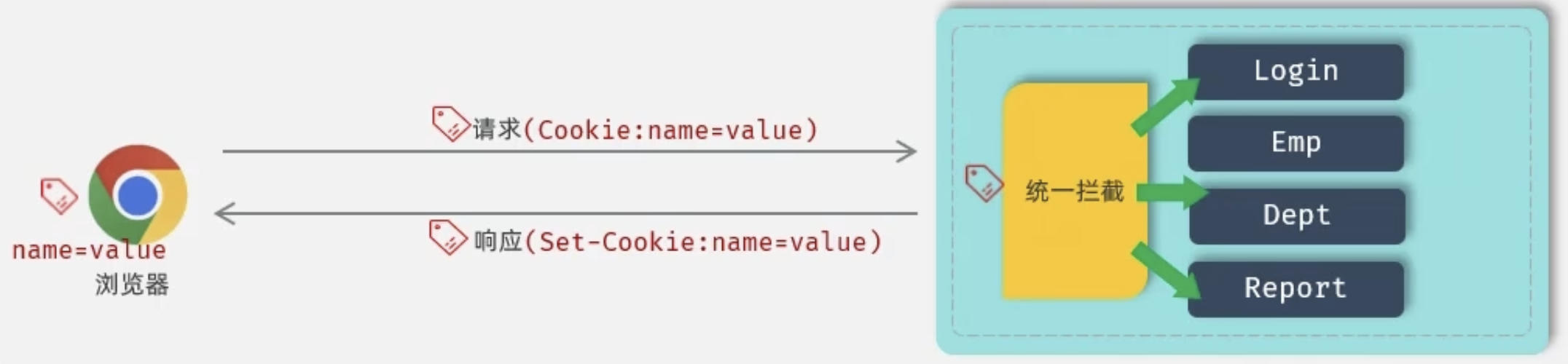
优点:HTTP协议中支持的技术
缺点:
- 移动端APP无法使用Cookie
- 不安全,用户可以自己禁用Cookie
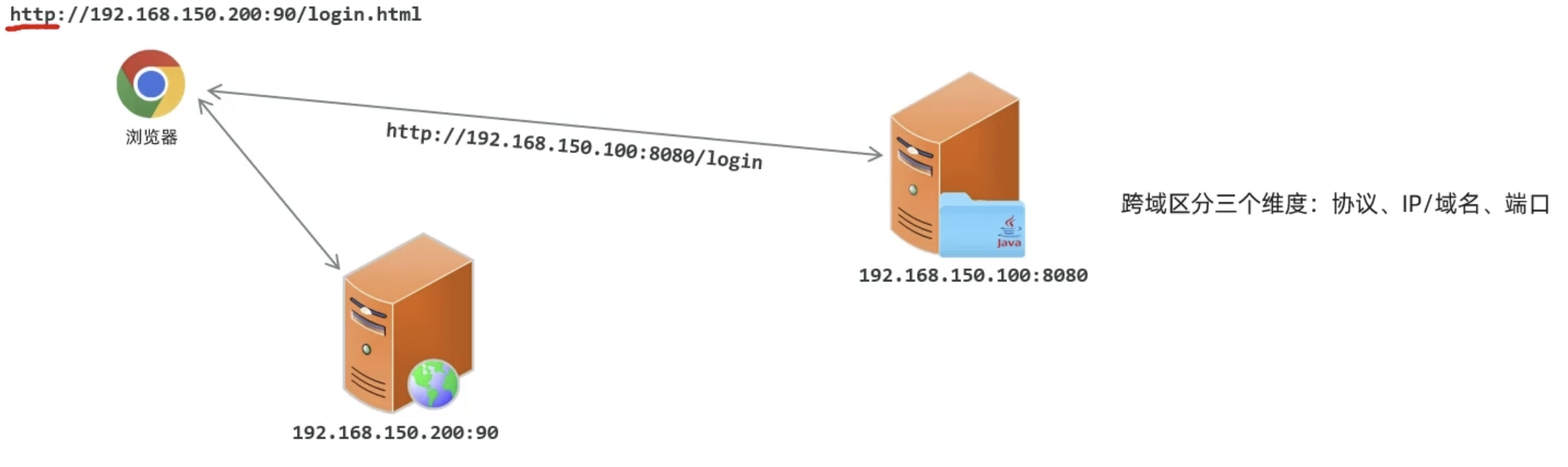
- Cookie不能跨域
2.1 什么是 Cookie?
Cookie 是服务器发送到用户浏览器并保存在客户端的一小块数据,浏览器会在后续请求中自动携带这些数据。
2.2 Cookie 的工作流程
1. 客户端发起请求 → 服务器
2. 服务器响应,设置 Set-Cookie 头
3. 浏览器保存 Cookie
4. 后续请求自动携带 Cookie → 服务器
5. 服务器读取 Cookie 识别用户
2.3 Cookie 的关键属性
Set-Cookie: sessionId=abc123; Domain=example.com; Path=/; Max-Age=3600; Secure; HttpOnly; SameSite=Strict
| 属性 | 说明 | 示例 |
|---|---|---|
| Name=Value | Cookie 的键值对 | userId=12345 |
| Domain | Cookie 的有效域名 | example.com |
| Path | Cookie 的有效路径 | /api |
| Max-Age | 过期时间(秒) | 3600(1小时) |
| Expires | 具体过期时间 | Wed, 21 Oct 2025 07:28:00 GMT |
| Secure | 仅通过 HTTPS 传输 | 布尔值 |
| HttpOnly | 禁止 JavaScript 访问 | 布尔值(防 XSS) |
| SameSite | 跨站请求限制 | Strict/Lax/None |
2.4 Cookie 代码示例
Node.js (Express) 设置 Cookie:
// 设置 Cookie
app.get('/login', (req, res) => {
  res.cookie('userId', '12345', {
    maxAge: 3600000,      // 1小时
    httpOnly: true,       // 防止 XSS
    secure: true,         // 仅 HTTPS
    sameSite: 'strict'    // 防止 CSRF
  });
  res.send('登录成功');
});

// 读取 Cookie
app.get('/profile', (req, res) => {
  const userId = req.cookies.userId;
  res.send(`用户ID: ${userId}`);
});

// 删除 Cookie
app.get('/logout', (req, res) => {
  res.clearCookie('userId');
  res.send('已退出');
});
Java (Spring Boot) 示例:
@GetMapping("/login")
public ResponseEntity<String> login(HttpServletResponse response) {
    Cookie cookie = new Cookie("userId", "12345");
    cookie.setMaxAge(3600);
    cookie.setHttpOnly(true);
    cookie.setSecure(true);
    cookie.setPath("/");
    response.addCookie(cookie);
    return ResponseEntity.ok("登录成功");
}
2.5 Cookie 的优缺点
优点:
- ✅ 实现简单,浏览器自动管理
- ✅ 可设置过期时间,持久化存储
- ✅ 减轻服务器存储压力
缺点:
- ❌ 存储容量小(4KB 限制)
- ❌ 安全性较低(易被窃取、篡改)
- ❌ 每次请求都携带,增加带宽消耗
- ❌ 跨域限制
3、Session 详解
3.1 什么是 Session?
Session 是服务器端的会话机制,数据存储在服务器,通过 Session ID 关联客户端。
3.2 Session 的工作流程
1. 客户端首次请求 → 服务器
2. 服务器创建 Session,生成唯一 Session ID
3. 服务器通过 Cookie 将 Session ID 发送给客户端
4. 客户端后续请求携带 Session ID
5. 服务器根据 Session ID 查找对应的 Session 数据
3.3 Session 存储方式
| 存储方式 | 说明 | 适用场景 |
|---|---|---|
| 内存存储 | 存储在服务器内存 | 单机、开发环境 |
| 文件存储 | 存储在服务器文件系统 | 小型应用 |
| 数据库存储 | 存储在 MySQL/PostgreSQL | 需要持久化 |
| 缓存存储 | 存储在 Redis/Memcached | 分布式、高并发 |
3.4 Session 代码示例
Node.js (Express + express-session):
const session = require('express-session');
const RedisStore = require('connect-redis')(session);
const redis = require('redis');

const redisClient = redis.createClient();

app.use(session({
  store: new RedisStore({ client: redisClient }),
  secret: 'your-secret-key',
  resave: false,
  saveUninitialized: false,
  cookie: {
    maxAge: 3600000,
    httpOnly: true,
    secure: true
  }
}));

// 设置 Session
app.post('/login', (req, res) => {
  req.session.userId = '12345';
  req.session.username = 'john';
  res.send('登录成功');
});

// 读取 Session
app.get('/profile', (req, res) => {
  if (req.session.userId) {
    res.json({
      userId: req.session.userId,
      username: req.session.username
    });
  } else {
    res.status(401).send('未登录');
  }
});

// 销毁 Session
app.post('/logout', (req, res) => {
  req.session.destroy((err) => {
    if (err) {
      return res.status(500).send('退出失败');
    }
    res.clearCookie('connect.sid');
    res.send('已退出');
  });
});
Java (Spring Boot) 示例:
@PostMapping("/login")
public String login(HttpSession session) {
    session.setAttribute("userId", "12345");
    session.setAttribute("username", "john");
    session.setMaxInactiveInterval(3600); // 1小时
    return "登录成功";
}

@GetMapping("/profile")
public Map<String, Object> profile(HttpSession session) {
    String userId = (String) session.getAttribute("userId");
    if (userId == null) {
        throw new UnauthorizedException("未登录");
    }
    Map<String, Object> data = new HashMap<>();
    data.put("userId", userId);
    data.put("username", session.getAttribute("username"));
    return data;
}

@PostMapping("/logout")
public String logout(HttpSession session) {
    session.invalidate();
    return "已退出";
}
3.5 Session 的优缺点
优点:
- ✅ 安全性高(数据存储在服务器)
- ✅ 存储容量大(无大小限制)
- ✅ 支持复杂数据类型
缺点:
- ❌ 占用服务器资源
- ❌ 分布式环境需要共享 Session
- ❌ 依赖 Cookie 传递 Session ID
四、Cookie vs Session 对比
| 对比维度 | Cookie | Session |
|---|---|---|
| 存储位置 | 客户端浏览器 | 服务器端 |
| 安全性 | 较低(可被窃取) | 较高 |
| 存储容量 | 4KB | 无限制 |
| 性能影响 | 每次请求携带 | 服务器内存/IO |
| 生命周期 | 可持久化 | 通常会话级别 |
| 跨域支持 | 受同源策略限制 | 需要特殊处理 |
| 适用场景 | 记住密码、主题设置 | 用户登录状态、购物车 |