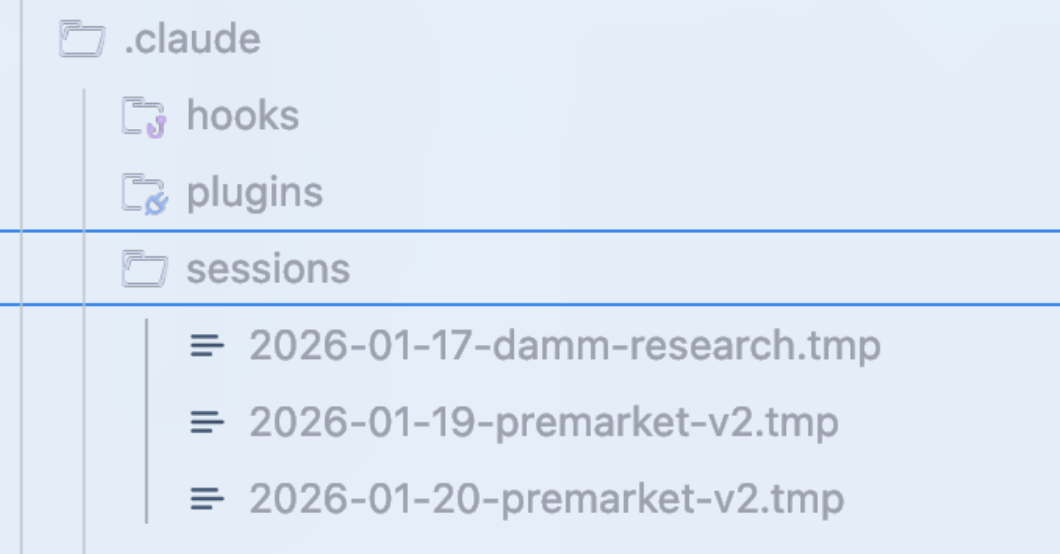
这是我每天用了十个月后,最终打磨出来的全套配置:skills、hooks、subagents、MCPs、plugins,还有那些真正好使的干货。
Skills and Commands 技能与指令
技能就像一套规则,限定在特定的范围和流程里用。当你需要执行某个特定工作流时,它们就是提示词的快捷方式。
用 Opus 4.5 猛敲了一通代码之后,是不是想清理掉那些没用的死代码和散落的 .md 文件?
直接运行 /refactor-clean 就行。需要测试?有 /tdd、/e2e、/test-coverage 等着你。更妙的是,这些 Skills 和命令还能在一个提示里串起来用。
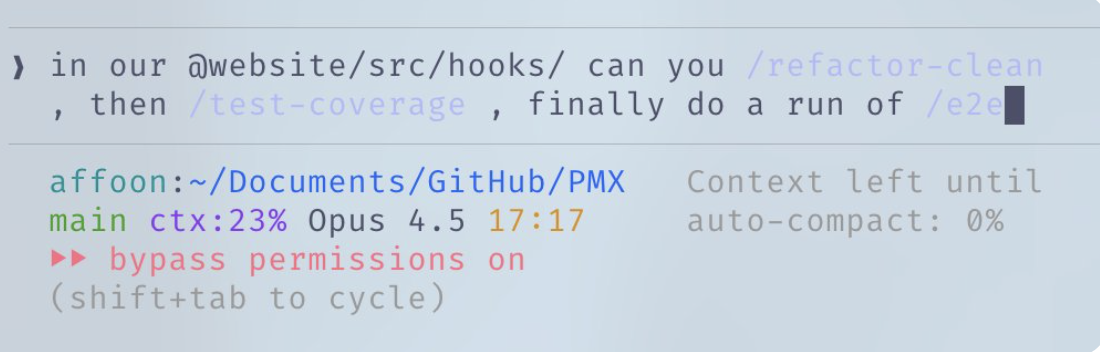
把多个命令串起来用
我能搞个技能,在检查点自动更新代码地图——这样 Claude 就能快速摸清你的代码库,不用费劲巴拉地到处探索了。
/.claude/skills/codemap-updater.md
Commands 是通过斜杠命令执行的技能。它们功能有重叠,但存储方式不同:
Skills: ~/.claude/skills – 这里放的是更宽泛的工作流定义
Commands: ~/.claude/commands 这个路径下存放的,都是一些能快速执行的提示词命令。
# Example skill structure
~/.claude/skills/
  pmx-guidelines.md      # Project-specific patterns
  coding-standards.md    # Language best practices
  tdd-workflow/          # Multi-file skill with README.md
  security-review/       # Checklist-based skill
Hooks 钩子
Hooks 是基于触发器的自动化操作,会在特定事件发生时启动。和 skills 不同,它们仅限于工具调用和生命周期事件。
PreToolUse —— 这个类型最常用,就是在工具执行之前触发,比如用来做验证啊、发个提醒什么的。
PostToolUse – 工具跑完活儿之后(比如格式化、反馈循环这些)
UserPromptSubmit – 你发消息那会儿
Stop – Claude 回完话的时候
PreCompact – 上下文压缩之前
Notification – 权限请求
举个栗子:在运行耗时命令前,tmux 会贴心提醒你
{
  "PreToolUse": [
    {
      "matcher": "tool == \"Bash\" && tool_input.command matches \"(npm|pnpm|yarn|cargo|pytest)\"",
      "hooks": [
        {
          "type": "command",
          "command": "if [ -z \"$TMUX\" ]; then echo '[Hook] Consider tmux for session persistence' >&2; fi"
        }
      ]
    }
  ]
}
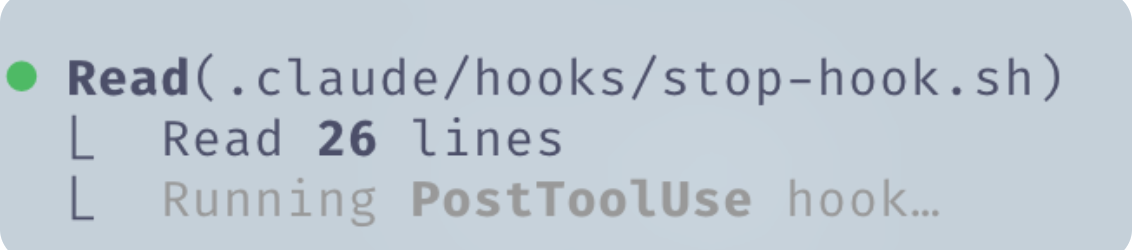
这是在 Claude Code 里运行 PostToolUse hook时,你能看到的反馈示例。
小窍门:用 hookify 插件来聊天式创建hooks,别再手动写 JSON 啦。直接运行 /hookify,然后告诉它你想要啥就行。
Subagents 子代理系统
子代理(Subagents)就像是你的总指挥(主 Claude)能派出去干活的“小分队”,它们各自负责一小块任务。这些小家伙可以在后台或前台运行,这样一来,主代理的“脑子”就腾出地方,不用啥都记着了。
子代理和技能(skills)搭配起来特别顺手——如果一个子代理能执行你的一部分技能,那它就能被派去独立完成任务,并且自主使用那些技能。你还可以给它们“划好地盘”,只授予特定的工具权限,让它们在安全的小环境里干活。
# Example subagent structure
~/.claude/agents/
  planner.md           # Feature implementation planning 功能实现规划
  architect.md         # System design decisions 系统设计决策
  tdd-guide.md         # Test-driven development 测试驱动开发
  code-reviewer.md     # Quality/security review 质量/安全审查
  security-reviewer.md # Vulnerability analysis 漏洞分析
  build-error-resolver.md
  e2e-runner.md
  refactor-cleaner.md
给每个子代理单独配置好允许使用的工具、MCPs 和权限,这样才能精准控制它们的职责范围。
Rules and Memory 规则与记忆
你的 `.rules` 文件夹里存放着 `.md` 文件,里面全是 Claude 必须时刻遵守的最佳实践。有两种路子可选:
单一CLAUDE.md – 所有内容整合于单一文件(用户或项目级别)
Rules 文件夹 —— 按不同关注点,把规则拆分成一个个模块化的 `.md` 文件
~/.claude/rules/
  security.md      # No hardcoded secrets, validate inputs 不硬编码密钥,验证输入
  coding-style.md  # Immutability, file organization 不可变性,文件组织
  testing.md       # TDD workflow, 80% coverage 测试驱动开发工作流,80%覆盖率
  git-workflow.md  # Commit format, PR process 提交格式,PR流程
  agents.md        # When to delegate to subagents 何时应授权给次级代理
  performance.md   # Model selection, context management 模型选择,上下文管理
代码库里别用表情符号
前端界面少用紫色系
部署前一定得跑测试
宁可拆成模块化代码,也别堆成臃肿的大文件
千万别把 console.log 提交上去!
MCPs (Model Context Protocol)
MCPs 能让 Claude 直接连上外部服务。它可不是要取代 API,而是给 API 套了个“提示词驱动”的壳子,这样一来,在信息里穿梭探索可就灵活多啦!
举个例子:用上 Supabase MCP,Claude 就能直接拉取特定数据,或者直接在上游跑 SQL,连复制粘贴都省了。对数据库、部署平台这些,也是一样的道理。

这是一个展示 supabase MCP 如何列出 public schema 中数据表的例子。
Chrome in Claude:这是一个内置的 MCP 插件,能让 Claude 自主控制你的浏览器——点点这儿,看看那儿,搞清楚东西是怎么运作的。
CRITICAL: Context Window Management 关键提醒:上下文窗口管理
对 MCP 插件要精挑细选。我习惯把所有 MCP 都保存在用户配置里,但会禁用所有暂时用不上的。你可以导航到 /plugins 目录往下翻,或者直接运行 /mcp 命令来管理。
注意了!如果你启用了太多工具,那原本 200k 的上下文窗口在压缩前可能只剩下 70k。性能会大打折扣。
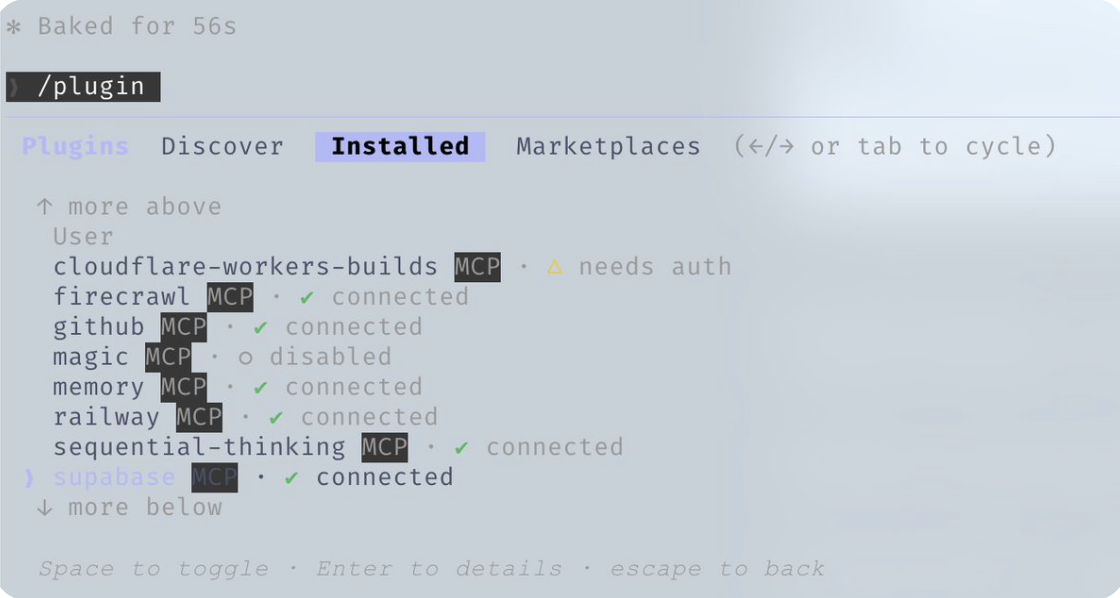
用 /plugins 命令去 MCPs 里看看当前装了哪些,以及它们的状态。
经验之谈:配置文件里可以放 20 到 30 个 MCPs,但最好同时启用的别超过 10 个,或者活跃工具总数别超过 80 个。
Plugins
插件把各种工具打包好,让你一键安装,再也不用费劲手动配置了。一个插件可以是技能和 MCP 的结合体,也可以是把 hooks 和工具打包在一起。
Installing plugins:
# Add a marketplace
claude plugin marketplace add https://github.com/mixedbread-ai/mgrep

# Open Claude, run /plugins, find new marketplace, install from there
LSP 插件:如果你经常在编辑器之外运行 Claude Code,这玩意儿就特别给力。Language Server Protocol 能让 Claude 实现实时类型检查、跳转到定义和智能补全,连 IDE 都不用开。
# Enabled plugins example
typescript-lsp@claude-plugins-official  # TypeScript intelligence TypeScript 智能
pyright-lsp@claude-plugins-official     # Python type checking Python 类型检查
hookify@claude-plugins-official         # Create hooks conversationally 以对话形式创建挂钩
mgrep@Mixedbread-Grep                   # Better search than ripgrep 比ripgrep更优的搜索工具
和 MCPs 一样要留个神——注意你的上下文窗口别爆了。
Tips and Tricks
Ctrl+U – 整行删除(比狂按退格键快多了)
! – 快速输入 bash 命令的前缀
@ – 快速搜索文件
/ – 呼出斜杠命令
Shift+Enter – 输入多行内容
Tab – 切换思考过程显示
Esc Esc – 中断 Claude / 恢复代码
/fork 命令 – 用对话分支来并行处理不相关的任务,别再一股脑儿发消息排队了
Git Worktrees – 实现多个 Claude 实例并行工作还不冲突,每个工作树都是独立的代码检出
git worktree add ../feature-branch feature-branch
# Now run separate Claude instances in each worktree
tmux 处理长时命令:实时流式查看 Claude 运行的日志和 bash 进程 让 claude code 把前后端服务器都跑起来,然后用 tmux 挂到会话里看日志,简直不要太方便!
tmux new -s dev
# Claude runs commands here, you can detach and reattach
tmux attach -t dev
mgrep > grep:mgrep 这玩意儿可比 ripgrep/grep 强太多了!去插件市场装一个,直接用 /mgrep 技能就行。本地搜索和网页搜索都能搞定,贼好用。
mgrep "function handleSubmit"  # Local search
mgrep --web "Next.js 15 app router changes"  # Web search
其他实用命令
/rewind – 一键回到之前的某个状态
/statusline – 自定义状态栏,显示分支、上下文百分比和待办事项
/checkpoints – 文件级别的撤销点
/compact – 手动触发上下文压缩
用 GitHub Actions 给你的 PR 设置代码审查。配置好后,Claude 就能自动帮你审 PR 啦!
Claude 批准了一个修复 bug 的 PR 执行有风险的操作时,记得开沙盒模式——Claude 会在受限制的环境里运行,不会动到你实际的系统。(想反着来,让 Claude 彻底放飞自我?那就用 –dangerously-skip-permissions 参数。不过千万小心,这玩意儿用不好可是会搞破坏的。)
On Editors
关于编辑器
虽然不用编辑器也行,但选个好用的,绝对能让你的 Claude Code 工作流如虎添翼。Claude Code 确实在任何终端都能跑,但要是搭配一个给力的编辑器,那感觉就完全不一样了——实时文件追踪、快速跳转、还有集成的命令执行,效率直接拉满。
Zed(我的心头好)
Zed 为啥和 Claude Code 这么搭呢:
智能面板无缝集成 – Zed 的 Claude 集成让你能实时追踪 Claude 编辑时的文件改动。在编辑器里就能直接跳转到 Claude 引用的各个文件,不用来回切换。
性能怪兽 – 用 Rust 写的,秒开不卡顿,再大的代码库也照样丝滑。
CMD+Shift+R 命令面板 – 所有自定义的斜杠命令、调试器和工具都集中在这个可搜索的界面里,随用随取。哪怕只是想快速跑个命令,也不用专门切到终端。
资源占用极低——就算你让 Claude 火力全开,它也绝不会跟它抢系统资源。
Vim 模式——全套 Vim 键位绑定,Vim 党狂喜
Zed Editor 里可以用 CMD+Shift+R 呼出自定义命令下拉菜单。
右下角那个靶心图标就是跟随模式。
分屏操作——一边开 Terminal 运行 Claude Code,另一边用编辑器,简直不要太方便!
按 Ctrl + G —— 秒开 Claude 正在处理的文件到 Zed 里,效率拉满!
开启自动保存——让 Claude 随时都能读到最新文件状态,永远不用担心版本落后!
善用 Git 集成——提交前先用编辑器的 Git 功能仔细检查 Claude 的改动,稳得很!
文件监视器 – 大多数编辑器都会自动重载已更改的文件,记得确认这个功能已经打开。
这个选择也不错,和 Claude Code 配合起来很顺手。你可以用终端模式,通过 \ide 参数让它和编辑器自动同步,开启 LSP 功能(不过现在有了插件,这个功能有点重复了)。或者你也可以选装扩展,它和编辑器集成得更紧密,界面风格也更统一。
我的配置
已安装:(我通常一次只启用其中的 4-5 个)
ralph-wiggum@claude-code-plugins       # Loop automation
frontend-design@claude-code-plugins    # UI/UX patterns
commit-commands@claude-code-plugins    # Git workflow
security-guidance@claude-code-plugins  # Security checks
pr-review-toolkit@claude-code-plugins  # PR automation
typescript-lsp@claude-plugins-official # TS intelligence
hookify@claude-plugins-official        # Hook creation
code-simplifier@claude-plugins-official
feature-dev@claude-code-plugins
explanatory-output-style@claude-code-plugins
code-review@claude-code-plugins
context7@claude-plugins-official       # Live documentation
pyright-lsp@claude-plugins-official    # Python types
mgrep@Mixedbread-Grep                  # Better search
已配置(用户级别):
{
  "github": { "command": "npx", "args": ["-y", "@modelcontextprotocol/server-github"] },
  "firecrawl": { "command": "npx", "args": ["-y", "firecrawl-mcp"] },
  "supabase": {
    "command": "npx",
    "args": ["-y", "@supabase/mcp-server-supabase@latest", "--project-ref=YOUR_REF"]
  },
  "memory": { "command": "npx", "args": ["-y", "@modelcontextprotocol/server-memory"] },
  "sequential-thinking": {
    "command": "npx",
    "args": ["-y", "@modelcontextprotocol/server-sequential-thinking"]
  },
  "vercel": { "type": "http", "url": "https://mcp.vercel.com" },
  "railway": { "command": "npx", "args": ["-y", "@railway/mcp-server"] },
  "cloudflare-docs": { "type": "http", "url": "https://docs.mcp.cloudflare.com/mcp" },
  "cloudflare-workers-bindings": {
    "type": "http",
    "url": "https://bindings.mcp.cloudflare.com/mcp"
  },
  "cloudflare-workers-builds": { "type": "http", "url": "https://builds.mcp.cloudflare.com/mcp" },
  "cloudflare-observability": {
    "type": "http",
    "url": "https://observability.mcp.cloudflare.com/mcp"
  },
  "clickhouse": { "type": "http", "url": "https://mcp.clickhouse.cloud/mcp" },
  "AbletonMCP": { "command": "uvx", "args": ["ableton-mcp"] },
  "magic": { "command": "npx", "args": ["-y", "@magicuidesign/mcp@latest"] }
}
按项目禁用(上下文窗口管理):
# In ~/.claude.json under projects.[path].disabledMcpServers
disabledMcpServers: [
  "playwright",
  "cloudflare-workers-builds",
  "cloudflare-workers-bindings",
  "cloudflare-observability",
  "cloudflare-docs",
  "clickhouse",
  "AbletonMCP",
  "context7",
  "magic"
]
这才是关键——我配置了 14 个 MCP,但每个项目只启用大概 5 到 6 个。这样能保持上下文窗口清爽高效。
{
  "PreToolUse": [
    // tmux reminder for long-running commands
    { "matcher": "npm|pnpm|yarn|cargo|pytest", "hooks": ["tmux reminder"] },
    // Block unnecessary .md file creation
    { "matcher": "Write && .md file", "hooks": ["block unless README/CLAUDE"] },
    // Review before git push
    { "matcher": "git push", "hooks": ["open editor for review"] }
  ],
  "PostToolUse": [
    // Auto-format JS/TS with Prettier
    { "matcher": "Edit && .ts/.tsx/.js/.jsx", "hooks": ["prettier --write"] },
    // TypeScript check after edits
    { "matcher": "Edit && .ts/.tsx", "hooks": ["tsc --noEmit"] },
    // Warn about console.log
    { "matcher": "Edit", "hooks": ["grep console.log warning"] }
  ],
  "Stop": [
    // Audit for console.logs before session ends
    { "matcher": "*", "hooks": ["check modified files for console.log"] }
  ]
}
能显示用户、目录、带修改标记的 git 分支、剩余上下文百分比、模型、时间,还有待办事项数量:
在我 Mac 根目录下的状态栏示例
~/.claude/rules/
  security.md      # Mandatory security checks
  coding-style.md  # Immutability, file size limits
  testing.md       # TDD, 80% coverage
  git-workflow.md  # Conventional commits
  agents.md        # Subagent delegation rules
  patterns.md      # API response formats
  performance.md   # Model selection (Haiku vs Sonnet vs Opus)
  hooks.md         # Hook documentation
~/.claude/agents/
  planner.md           # Break down features
  architect.md         # System design
  tdd-guide.md         # Write tests first
  code-reviewer.md     # Quality review
  security-reviewer.md # Vulnerability scan
  build-error-resolver.md
  e2e-runner.md        # Playwright tests
  refactor-cleaner.md  # Dead code removal
  doc-updater.md       # Keep docs synced
Key Takeaways 核心要点
别搞得太复杂——把配置当成微调,而不是搞架构设计
上下文窗口很宝贵——赶紧把不用的 MCPs 和插件都关掉!
并行执行大法好——开分支对话,用上 git worktrees!
重复劳动自动化——格式化、代码检查、提醒这些,统统用 hooks 搞定
给你的子智能体划好边界——工具别给太多,专注才能高效执行