1. 前端代码分析
找到src/views/course/course/index.vue文件,护理项目的前端代码已经添加了详细的注释,如下:
<template>
  <div class="app-container">

    <!-- 搜索表单 start -->
    <el-form :model="queryParams" ref="queryRef" :inline="true" v-show="showSearch" label-width="68px">
      <el-form-item label="课程编码" prop="code">
        <el-input
          v-model="queryParams.code"
          placeholder="请输入课程编码"
          clearable
          @keyup.enter="handleQuery"
        />
      </el-form-item>
      <el-form-item label="课程学科" prop="subject">
        <el-select v-model="queryParams.subject" placeholder="请选择课程学科" clearable>
          <el-option
            v-for="dict in course_subject"
            :key="dict.value"
            :label="dict.label"
            :value="dict.value"
          />
        </el-select>
      </el-form-item>
      <el-form-item label="课程名称" prop="name">
        <el-input
          v-model="queryParams.name"
          placeholder="请输入课程名称"
          clearable
          @keyup.enter="handleQuery"
        />
      </el-form-item>
      <el-form-item label="适用人群" prop="applicablePerson">
        <el-input
          v-model="queryParams.applicablePerson"
          placeholder="请输入适用人群"
          clearable
          @keyup.enter="handleQuery"
        />
      </el-form-item>
      <el-form-item>
        <el-button type="primary" icon="Search" @click="handleQuery">搜索</el-button>
        <el-button icon="Refresh" @click="resetQuery">重置</el-button>
      </el-form-item>
    </el-form>
    <!-- 搜索表单 end -->

    <!-- 按钮区域 start -->
    <el-row :gutter="10" class="mb8">
      <el-col :span="1.5">
        <el-button
          type="primary"
          plain
          icon="Plus"
          @click="handleAdd"
          v-hasPermi="['course:course:add']"
        >新增</el-button>
      </el-col>
      <el-col :span="1.5">
        <el-button
          type="success"
          plain
          icon="Edit"
          :disabled="single"
          @click="handleUpdate"
          v-hasPermi="['course:course:edit']"
        >修改</el-button>
      </el-col>
      <el-col :span="1.5">
        <el-button
          type="danger"
          plain
          icon="Delete"
          :disabled="multiple"
          @click="handleDelete"
          v-hasPermi="['course:course:remove']"
        >删除</el-button>
      </el-col>
      <el-col :span="1.5">
        <el-button
          type="warning"
          plain
          icon="Download"
          @click="handleExport"
          v-hasPermi="['course:course:export']"
        >导出</el-button>
      </el-col>
      <right-toolbar v-model:showSearch="showSearch" @queryTable="getList"></right-toolbar>
    </el-row>
    <!-- 按钮区域end -->

    <!-- 数据展示表格 start -->
    <el-table v-loading="loading" :data="courseList" @selection-change="handleSelectionChange">
      <el-table-column type="selection" width="55" align="center" />
      <el-table-column label="课程id" align="center" prop="id" />
      <el-table-column label="课程编码" align="center" prop="code" />
      <el-table-column label="课程学科" align="center" prop="subject">
        <template #default="scope">
          <dict-tag :options="course_subject" :value="scope.row.subject"/>
        </template>
      </el-table-column>
      <el-table-column label="课程名称" align="center" prop="name" />
      <el-table-column label="价格" align="center" prop="price" />
      <el-table-column label="适用人群" align="center" prop="applicablePerson" />
      <el-table-column label="课程介绍" align="center" prop="info" />
      <el-table-column label="操作" align="center" class-name="small-padding fixed-width">
        <template #default="scope">
          <el-button link type="primary" icon="Edit" @click="handleUpdate(scope.row)" v-hasPermi="['course:course:edit']">修改</el-button>
          <el-button link type="primary" icon="Delete" @click="handleDelete(scope.row)" v-hasPermi="['course:course:remove']">删除</el-button>
        </template>
      </el-table-column>
    </el-table>
    <!-- 数据展示表格 end -->

    <!-- 分页区域 start -->
    <pagination
      v-show="total>0"
      :total="total"
      v-model:page="queryParams.pageNum"
      v-model:limit="queryParams.pageSize"
      @pagination="getList"
    />
    <!-- 分页区域 end -->

    <!-- 添加或修改课程管理对话框 -->
    <el-dialog :title="title" v-model="open" width="500px" append-to-body>
      <el-form ref="courseRef" :model="form" :rules="rules" label-width="80px">
        <el-form-item label="课程编码" prop="code">
          <el-input v-model="form.code" placeholder="请输入课程编码" />
        </el-form-item>
        <el-form-item label="课程学科" prop="subject">
          <el-select v-model="form.subject" placeholder="请选择课程学科">
            <el-option
              v-for="dict in course_subject"
              :key="dict.value"
              :label="dict.label"
              :value="dict.value"
            ></el-option>
          </el-select>
        </el-form-item>
        <el-form-item label="课程名称" prop="name">
          <el-input v-model="form.name" placeholder="请输入课程名称" />
        </el-form-item>
        <el-form-item label="价格" prop="price">
          <el-input v-model="form.price" placeholder="请输入价格" />
        </el-form-item>
        <el-form-item label="适用人群" prop="applicablePerson">
          <el-input v-model="form.applicablePerson" placeholder="请输入适用人群" />
        </el-form-item>
        <el-form-item label="课程介绍" prop="info">
          <el-input v-model="form.info" placeholder="请输入课程介绍" />
        </el-form-item>
      </el-form>
      <template #footer>
        <div class="dialog-footer">
          <el-button type="primary" @click="submitForm">确 定</el-button>
          <el-button @click="cancel">取 消</el-button>
        </div>
      </template>
    </el-dialog>
  </div>
</template>

<script setup name="Course">


// 引入后端api接口
import { listCourse, getCourse, delCourse, addCourse, updateCourse } from "@/api/course/course";
// 获取当前实例代理对象,用于访问组件数据、方法
const { proxy } = getCurrentInstance();
// 获取课程学科的数据字典
const { course_subject } = proxy.useDict('course_subject');
// 列表数据
const courseList = ref([]);
// 是否显示弹框
const open = ref(false);
// 是否显示加载状态
const loading = ref(true);
// 是否显示搜索栏
const showSearch = ref(true);
// 复选框,被选中id的数组
const ids = ref([]);
// 复选框,是否单选,用于高亮修改、删除按钮
const single = ref(true);
// 复选框,是否多选,仅高亮删除按钮
const multiple = ref(true);
// 总(记录)条数
const total = ref(0);
// 用于区分新增、修改对话框标题
const title = ref("");
// 定义reactive响应式对象
const data = reactive({
  // 新增或修改表单数据
  form: {},
  // 搜索条件参数
  queryParams: {
    pageNum: 1,
    pageSize: 10,
    code: null,
    subject: null,
    name: null,
    applicablePerson: null,
  },
  // 表单校验规则
  rules: {
    code: [
      { required: true, message: "课程编码不能为空", trigger: "blur" }
    ],
    subject: [
      { required: true, message: "课程学科不能为空", trigger: "change" }
    ],
    name: [
      { required: true, message: "课程名称不能为空", trigger: "blur" }
    ],
    price: [
      { required: true, message: "价格不能为空", trigger: "blur" }
    ],
    applicablePerson: [
      { required: true, message: "适用人群不能为空", trigger: "blur" }
    ],
    info: [
      { required: true, message: "课程介绍不能为空", trigger: "blur" }
    ],
  }
});
// 将data对象的三个属性,转换为ref响应式对象
const { queryParams, form, rules } = toRefs(data);

/** 查询课程管理列表 */
function getList() {
  loading.value = true;
  listCourse(queryParams.value).then(response => {
    courseList.value = response.rows;
    total.value = response.total;
    loading.value = false;
  });
}

// 取消按钮
function cancel() {
  open.value = false;
  reset();
}

// 表单重置
function reset() {
  form.value = {
    id: null,
    code: null,
    subject: null,
    name: null,
    price: null,
    applicablePerson: null,
    info: null,
    createTime: null,
    updateTime: null
  };
  proxy.resetForm("courseRef");
}

/** 搜索按钮操作 */
function handleQuery() {
  queryParams.value.pageNum = 1;
  getList();
}

/** 重置按钮操作 */
function resetQuery() {
  proxy.resetForm("queryRef");
  handleQuery();
}

// 多选框选中数据
function handleSelectionChange(selection) {
  ids.value = selection.map(item => item.id);
  single.value = selection.length != 1;
  multiple.value = !selection.length;
}

/** 新增按钮操作 */
function handleAdd() {
  reset();
  open.value = true;
  title.value = "添加课程管理";
}

/** 修改按钮操作 */
function handleUpdate(row) {
  reset();
  const _id = row.id || ids.value
  getCourse(_id).then(response => {
    form.value = response.data;
    open.value = true;
    title.value = "修改课程管理";
  });
}

/** 提交按钮 */
function submitForm() {
  proxy.$refs["courseRef"].validate(valid => {
    if (valid) {
      if (form.value.id != null) {
        updateCourse(form.value).then(response => {
          proxy.$modal.msgSuccess("修改成功");
          open.value = false;
          getList();
        });
      } else {
        addCourse(form.value).then(response => {
          proxy.$modal.msgSuccess("新增成功");
          open.value = false;
          getList();
        });
      }
    }
  });
}

/** 删除按钮操作 */
function handleDelete(row) {
  const _ids = row.id || ids.value;
  proxy.$modal.confirm('是否确认删除课程管理编号为"' + _ids + '"的数据项?').then(function() {
    return delCourse(_ids);
  }).then(() => {
    getList();
    proxy.$modal.msgSuccess("删除成功");
  }).catch(() => {});
}

/** 导出按钮操作 */
function handleExport() {
  proxy.download('course/course/export', {
    ...queryParams.value
  }, `course_${new Date().getTime()}.xlsx`)
}

// 页面加载时执行-查询课程管理列表
getList();
</script>
2.后端代码分析
2.1 CourseController
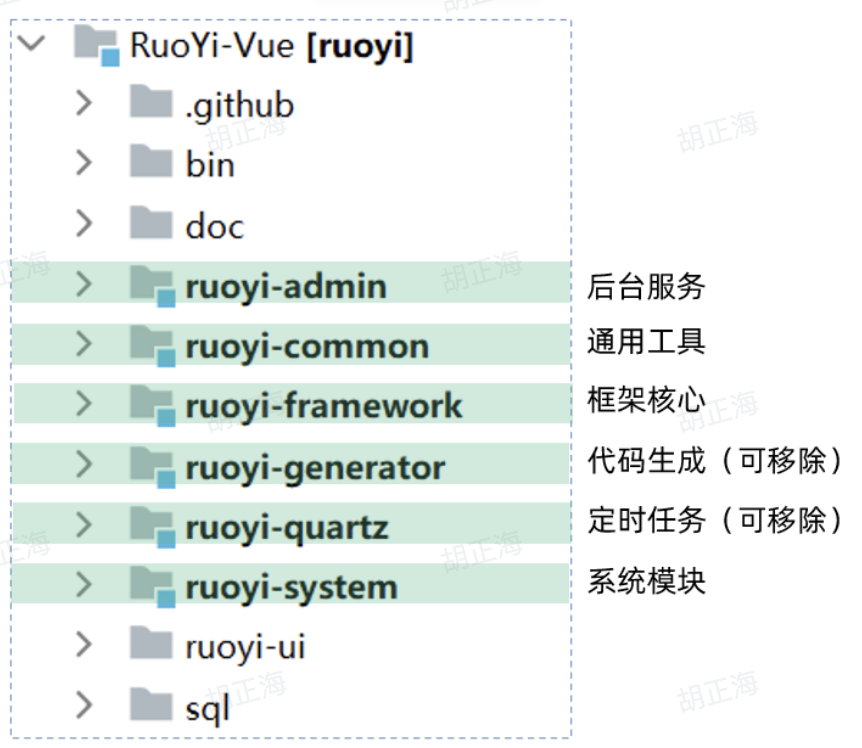
ruoyi-admin模块下找到这个类:com.ruoyi.web.controller.course.CourseController里面有5个对应的方法接口,详细代码如下:
package com.sky.course.controller;

import com.sky.common.annotation.Log;
import com.sky.common.core.controller.BaseController;
import com.sky.common.core.domain.AjaxResult;
import com.sky.common.core.page.TableDataInfo;
import com.sky.common.enums.BusinessType;
import com.sky.common.utils.poi.ExcelUtil;
import com.sky.course.domain.Course;
import com.sky.course.service.ICourseService;
import org.springframework.beans.factory.annotation.Autowired;
import org.springframework.security.access.prepost.PreAuthorize;
import org.springframework.web.bind.annotation.*;

import javax.servlet.http.HttpServletResponse;
import java.util.List;

/**
 * 课程管理Controller
 *
 * @author itheima
 */
@RestController
@RequestMapping("/course/course")
public class CourseController extends BaseController
{
    @Autowired
    private ICourseService courseService;

    /**
     * 查询课程管理列表
     */
    @PreAuthorize("@ss.hasPermi('course:course:list')")
    @GetMapping("/list")
    public TableDataInfo list(Course course)
    {
        //1. 开启分页
        startPage();
        //2. 查询课程列表
        List<Course> list = courseService.selectCourseList(course);
        //3. 返回表格分页数据对象
        return getDataTable(list);
    }

    /**
     * 导出课程管理列表
     */
    @PreAuthorize("@ss.hasPermi('course:course:export')")
    @Log(title = "课程管理", businessType = BusinessType.EXPORT)
    @PostMapping("/export")
    public void export(HttpServletResponse response, Course course)
    {
        List<Course> list = courseService.selectCourseList(course);
        ExcelUtil<Course> util = new ExcelUtil<Course>(Course.class);
        util.exportExcel(response, list, "课程管理数据");
    }

    /**
     * 获取课程管理详细信息
     */
    @PreAuthorize("@ss.hasPermi('course:course:query')")
    @GetMapping(value = "/{id}")
    public AjaxResult getInfo(@PathVariable("id") Long id)
    {
        return success(courseService.selectCourseById(id));
    }

    /**
     * 新增课程管理
     */
    @PreAuthorize("@ss.hasPermi('course:course:add')")
    @Log(title = "课程管理", businessType = BusinessType.INSERT)
    @PostMapping
    public AjaxResult add(@RequestBody Course course)
    {
        return toAjax(courseService.insertCourse(course));
    }

    /**
     * 修改课程管理
     */
    @PreAuthorize("@ss.hasPermi('course:course:edit')")
    @Log(title = "课程管理", businessType = BusinessType.UPDATE)
    @PutMapping
    public AjaxResult edit(@RequestBody Course course)
    {
        return toAjax(courseService.updateCourse(course));
    }

    /**
     * 删除课程管理
     */
    @PreAuthorize("@ss.hasPermi('course:course:remove')")
    @Log(title = "课程管理", businessType = BusinessType.DELETE)
        @DeleteMapping("/{ids}")
    public AjaxResult remove(@PathVariable Long[] ids)
    {
        return toAjax(courseService.deleteCourseByIds(ids));
    }
}
2.2 BaseController
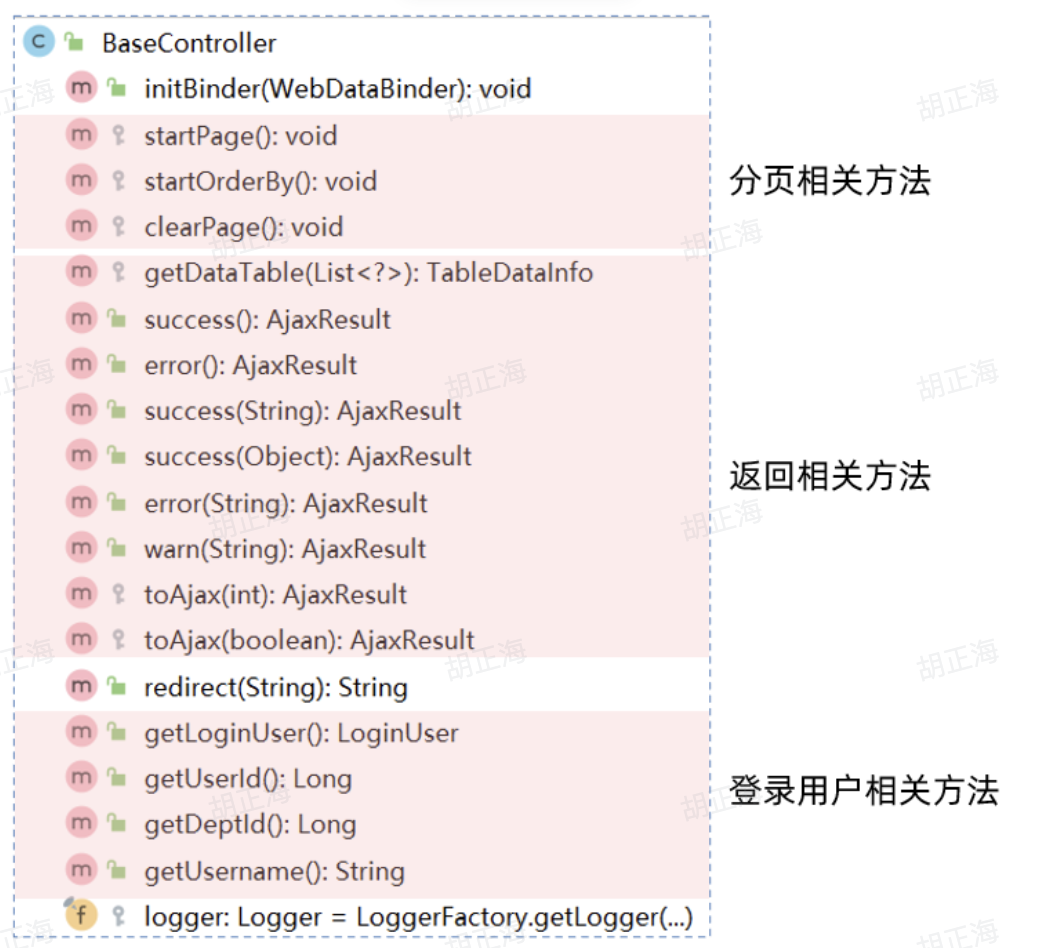
Controller继承了BaseController,其中BaseController详细定义如下图:
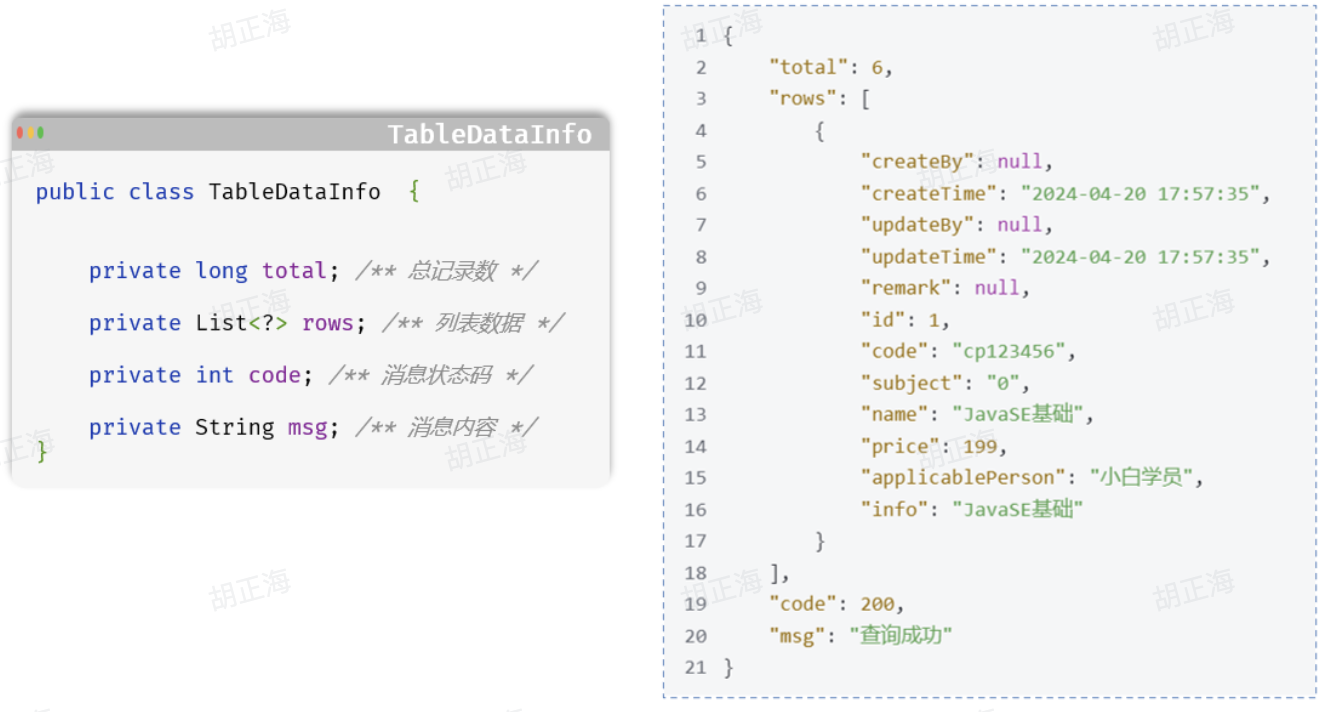
2.3 TableDataInfo
分页查询统一返回对象:表格分页数据对象
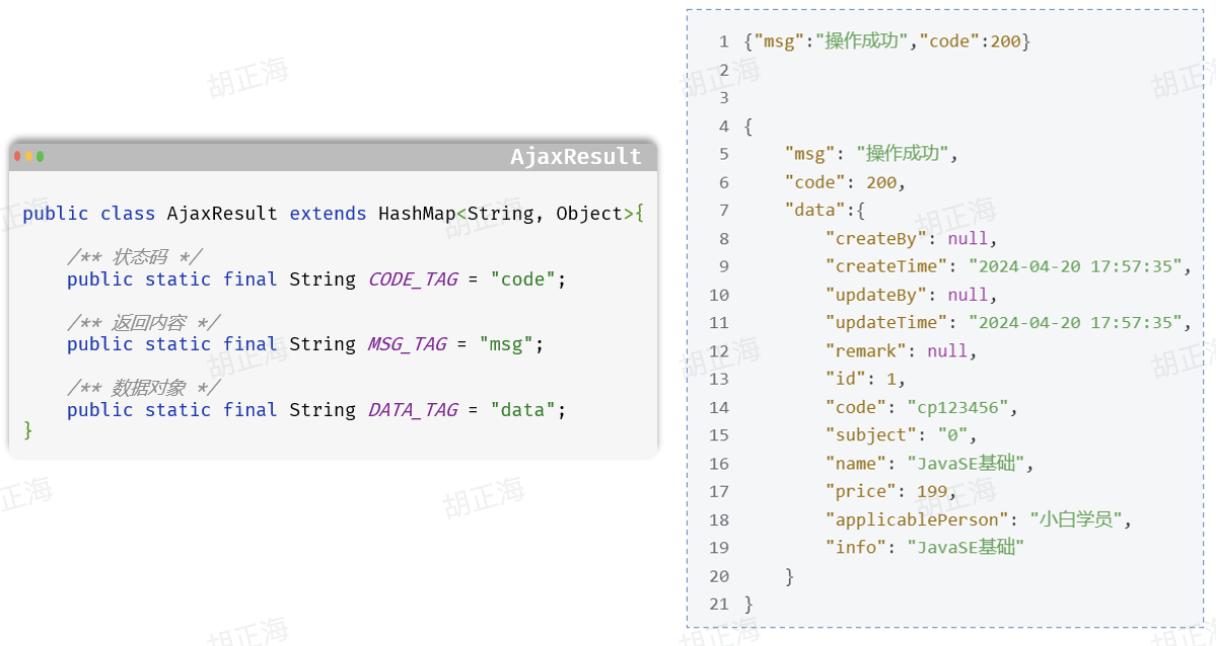
2.4 AjaxResult
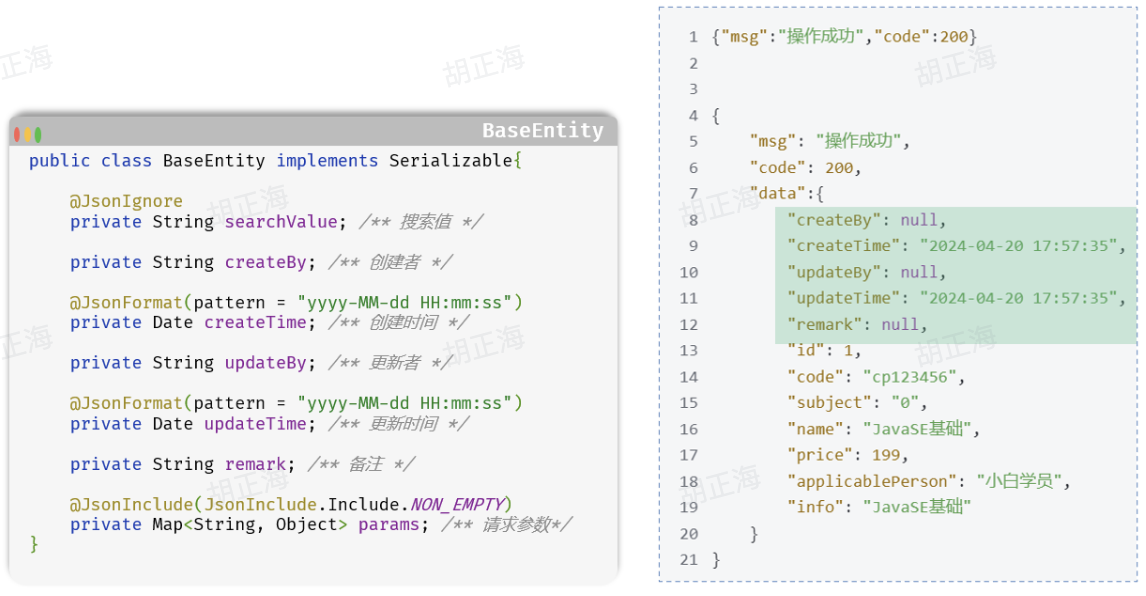
2.5 BaseEntity
所有实体类默认继承的BaseEntity基类
2.6 权限注解
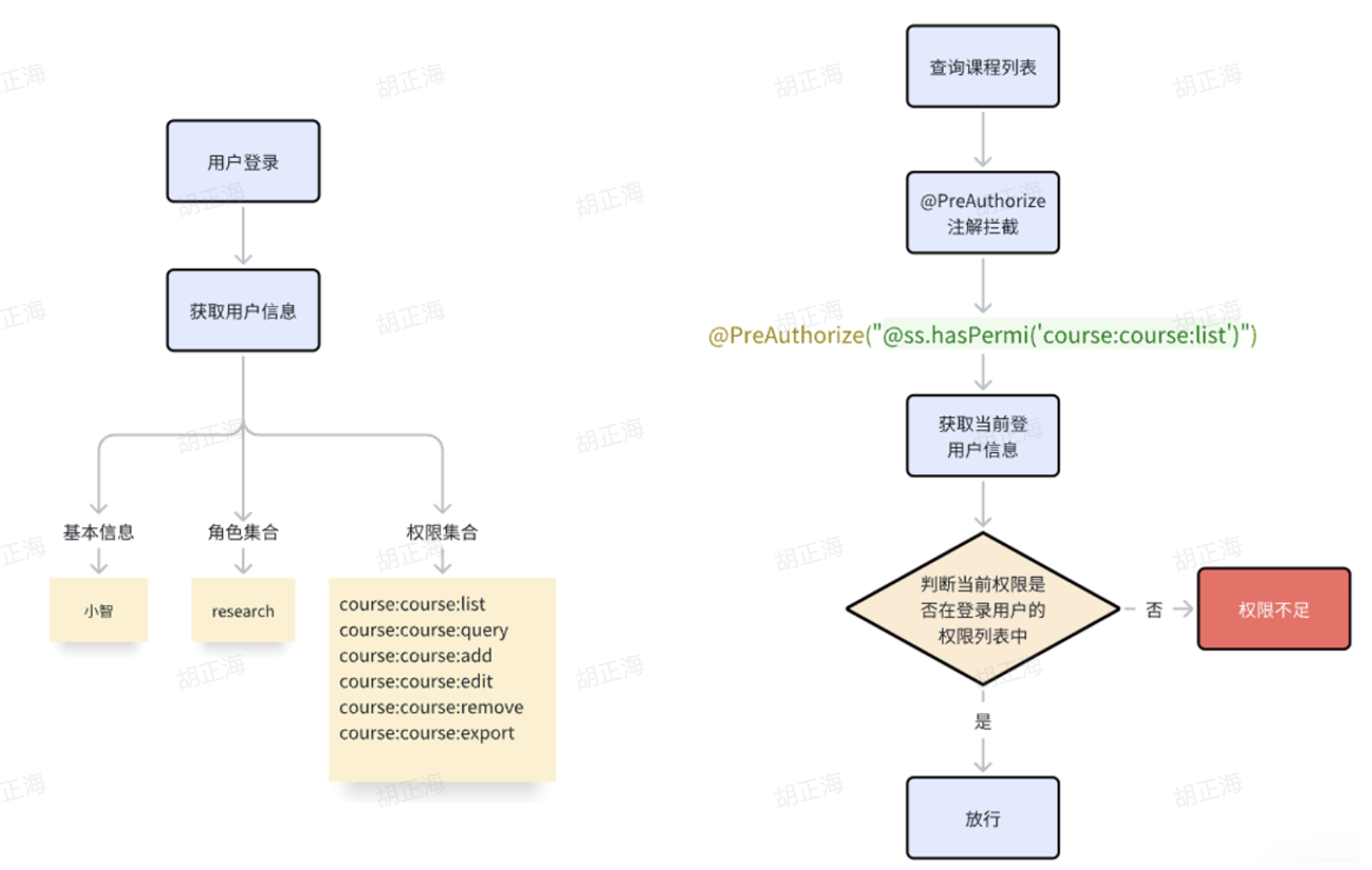
@PreAuthorize 注解是 Spring Security 框架中用来做权限检查的。
它在运行方法前先验证权限,权限够就放行,不够就拦截。
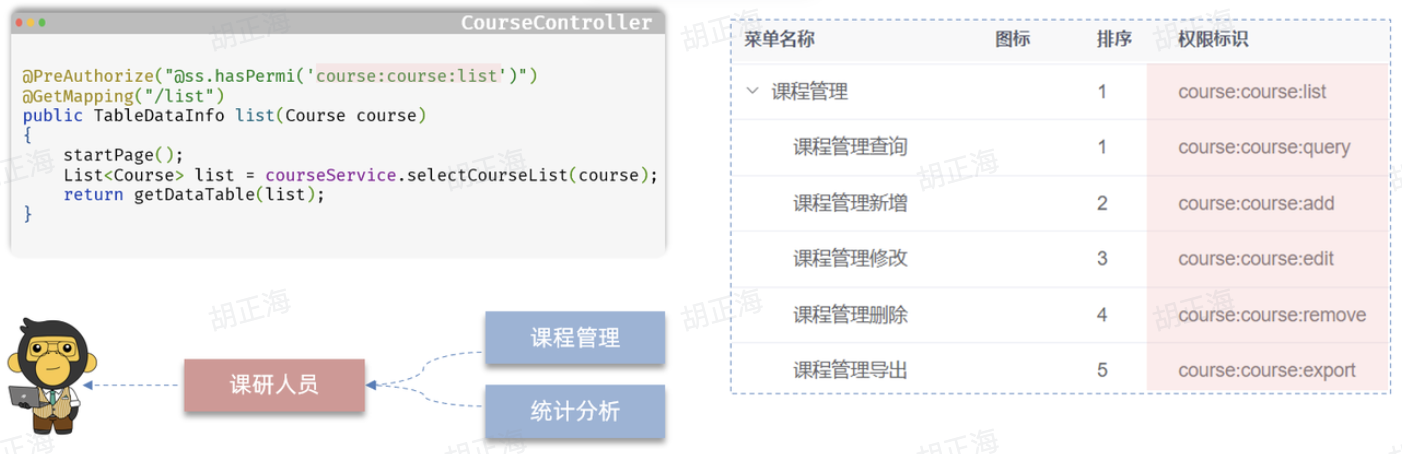
权限控制流程图
3.前后端交互流程
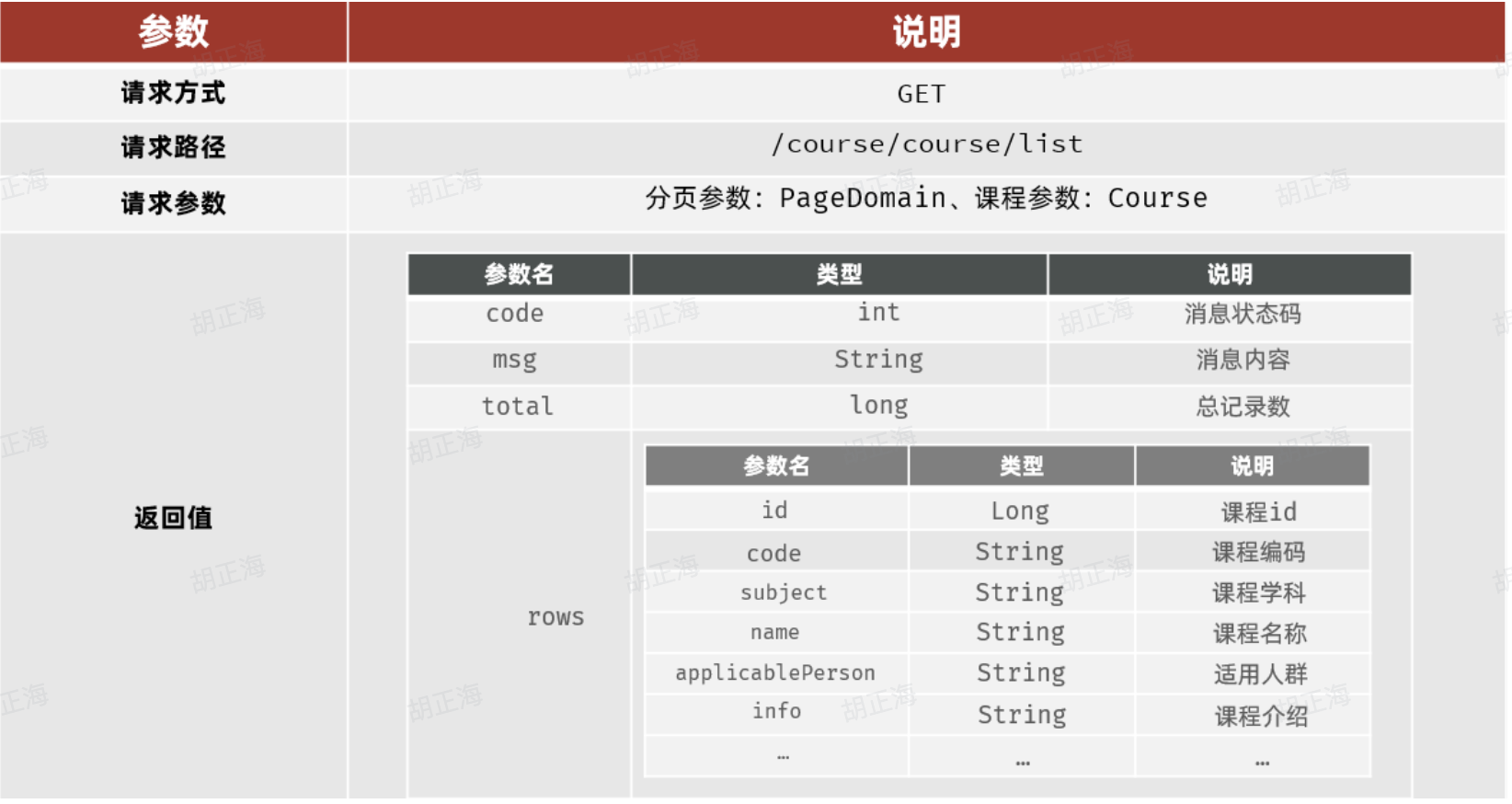
查询课程管理列表
3.1 接口文档
3.2 跨域
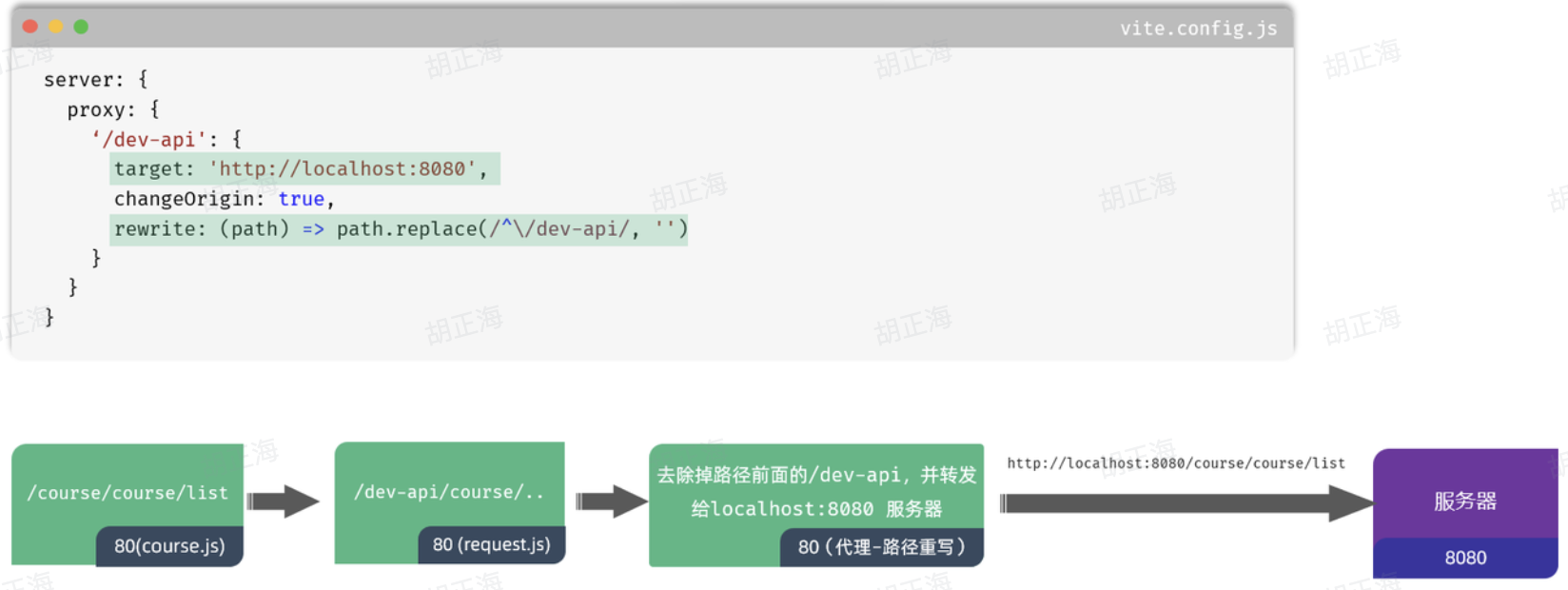
在前端开发中,跨域是一个常见的问题,特别是在使用Vue框架进行开发时。跨域是指在浏览器中发送的AJAX请求的目标地址与当前页面的地址不在同一个域下,这会导致浏览器的同源策略产生限制,从而阻止了跨域请求的发送。然而,我们可以通过代理服务器来解决这个问题。
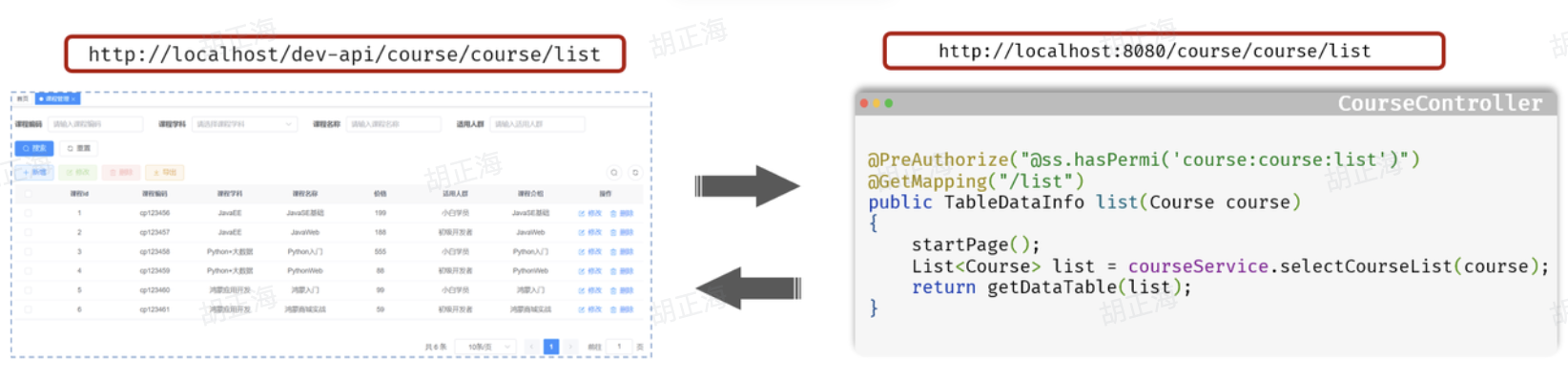
代理服务器是位于客户端和目标服务器之间的一台服务器,它接收客户端发送的请求,并将请求转发给目标服务器。通过在代理服务器上进行请求转发,可以绕过浏览器的同源策略限制,从而实现跨域请求。
在vue.config.js文件中添加以下内容: